Overview
Windows Assessment and Deployment Kit (ADK) එකෙන් Windows images customize කරන්න, assess කරන්න සහ deploy කරන්න tools ලබා දෙනවා. මේ guide එකෙන් නිවැරදි version එක download කරන එක, ඒක install කරන එක, සහ WinPE add-on එක add කරන එක cover කරනවා.
Windows ADK download කිරීම.
Key Takeaways
- ADK එකේ DISM, USMT, සහ Sysprep support වගේ deployment tools තියෙනවා.
- ADK version එක ඔබේ Windows version එකට match කරන්න.
- WinPE දැන් ADK එක්ක install කරන වෙනම add-on එකක්.
- Download කරන්නෙ Microsoft ගේ official site එකෙන් විතරයි.
Note: authentic installers තහවුරු කරගන්න ADK එකයි WinPE add-on එකයි හැමවිටම Microsoft ගේ official Learn/Docs site එකෙන් download කරන්න.
Choose the Right Version
1. ඔබේ target Windows version එක identify කරන්න (උදා: Windows 11 23H2/24H2 හෝ Windows 10 22H2).
2. Microsoft ගේ official ADK page එකේ, ඒ version එකට match වෙන ADK එක තෝරන්න.
3. mismatched ADK එකකින් deployment issues ඇති වෙන්න පුළුවන් බව සටහන් කරගන්න.
Install the ADK
1. upgrade කරනවා නම් මුලින්ම පරණ ADK එකක් තියෙනවා නම් uninstall කරන්න.
2. download කරපු adksetup.exe run කරන්න.
3. මේ computer එකේ install කරන්න තෝරන්න (හෝ පස්සට download කරන්න).
4. ඔබට ඕන features තෝරන්න (Deployment Tools, Imaging, USMT, ආදිය).
5. Install click කරලා ඉවර වෙනකම් ඉන්න.
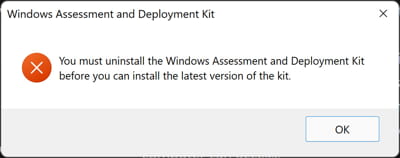
අලුත් එකක් install කරන්න කලින් පරණ ADK එකක් uninstall කරන්න.
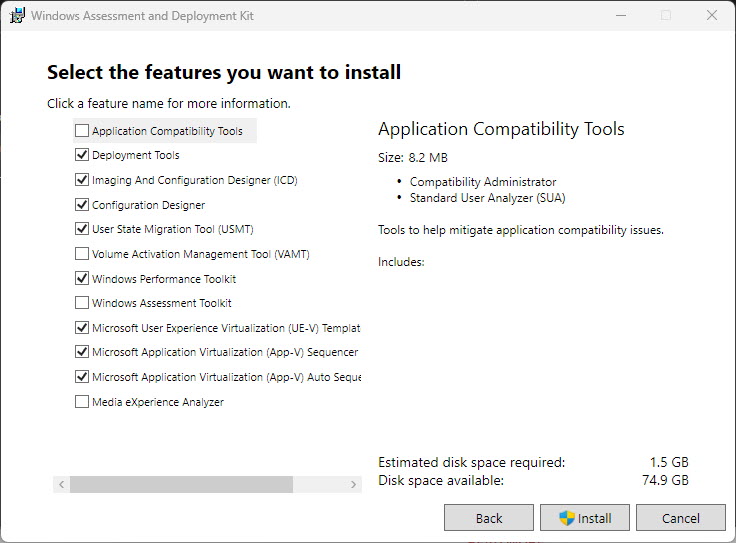
Install කරන්න ADK components තෝරන්න.
Install the WinPE Add-On
1. Microsoft එකෙන් "Windows PE add-on for the ADK" (එම version එකම) download කරන්න.
2. adkwinpesetup.exe run කරන්න.
3. WinPE tools available වෙන්න main ADK එකට පස්සෙ ඒක install කරන්න.
Validate the Installation
1. Start menu එකෙන් "Deployment and Imaging Tools Environment" open කරන්න.
2. dism /? හෝ copype වගේ tool එකක් run කරලා ඒක වැඩ කරනවද කියලා confirm කරන්න.
3. ඕන නම් Settings > Apps එකේ installed features check කරන්න.
Troubleshooting
Problem: install එක fail හෝ hang වෙනවා.
Solution: කලින් ADK versions uninstall කරන්න, downloader එකට internet access තියෙන එක තහවුරු කරගන්න, සහ setup එක administrator විදිහට run කරන්න.
Problem: WinPE tools නෑ.
Solution: ඔබේ ADK version එකට match වෙන වෙනම WinPE add-on එක install කරන්න.
Problem: version mismatch errors.
Solution: ඔබේ Windows release එකට අනුරූප වෙන ADK/WinPE version එක පාවිච්චි කරන්න.
Problem: copype නොහමුවෙනවා.
Solution: නිවැරදි paths set කරන "Deployment and Imaging Tools Environment" shortcut එක open කරන්න.
Conclusion
Windows ADK එකෙන් ඔබට Microsoft ගේ deployment සහ imaging tools සපයනවා. ඔබේ Windows release එකට match වෙන version එක official site එකෙන් download කරලා, ඔබට ඕන components install කරලා, ඔබේ deployment toolkit එක සම්පූර්ණ කරන්න WinPE add-on එක add කරන්න.
About TechHub
මේ guide එක TechHub Knowledge Base එකේ කොටසක්. තව step-by-step IT guides සහ support වලට techhub.com.lk එකට යන්න.