Overview
Intel publishes its graphics drivers in several branches depending on your GPU and processor generation. Choosing the correct branch ensures the best stability and performance. This guide explains the main Intel graphics driver branches and shows how to find, download, and install the right driver for your hardware.
Intel maintains several graphics driver branches for different GPUs.
Key Takeaways
- Intel splits graphics drivers into branches: Arc & Iris Xe, Arc Pro, and legacy lines for older processors.
- The Intel Driver & Support Assistant automatically detects and installs the correct driver.
- Beta drivers add the newest features; stable drivers prioritise reliability.
- Always download from Intel’s official site or the Driver & Support Assistant.
Intel Graphics Driver Branches
- Arc & Iris Xe (current) — for Intel Arc discrete GPUs and 11th Gen and newer Iris Xe integrated graphics; offered in stable and beta versions.
- Arc Pro — for Intel Arc Pro professional graphics.
- Legacy 7th–10th Gen — a separate maintenance branch for those processors.
- Legacy 6th–10th Gen — an older maintenance branch for earlier processors.
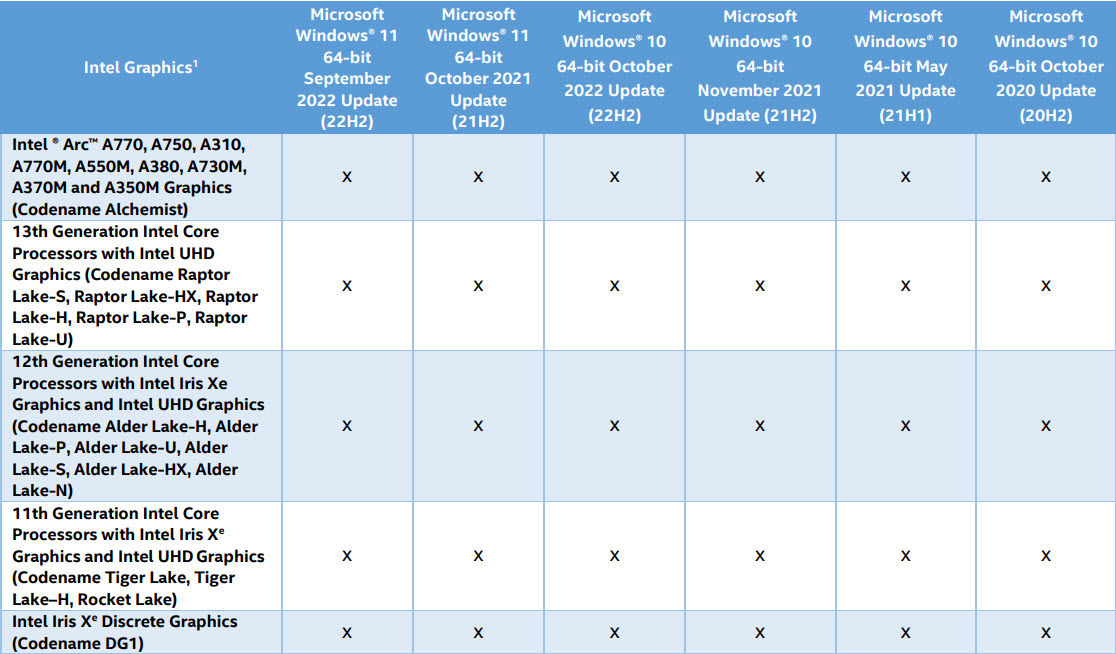
The Arc & Iris Xe branch covers current Intel graphics.
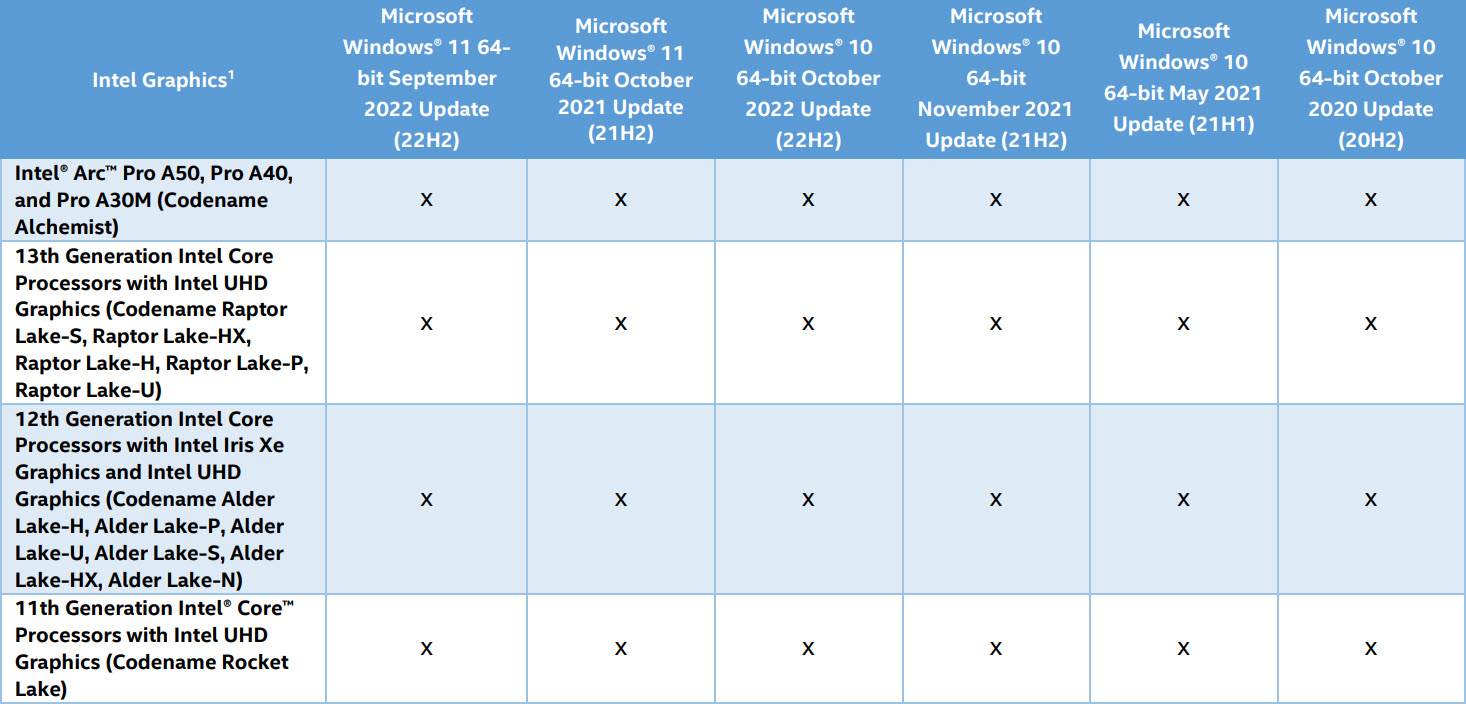
Intel Arc Pro has its own professional driver branch.
Find Out Which GPU You Have
1. Right-click the Start button and choose Device Manager.
2. Expand Display adapters to see your Intel graphics model.
3. For more detail, press Windows key + R, type dxdiag, and check the Display tab.
4. Note whether you have Intel Arc, Iris Xe, or an older HD/UHD Graphics model.
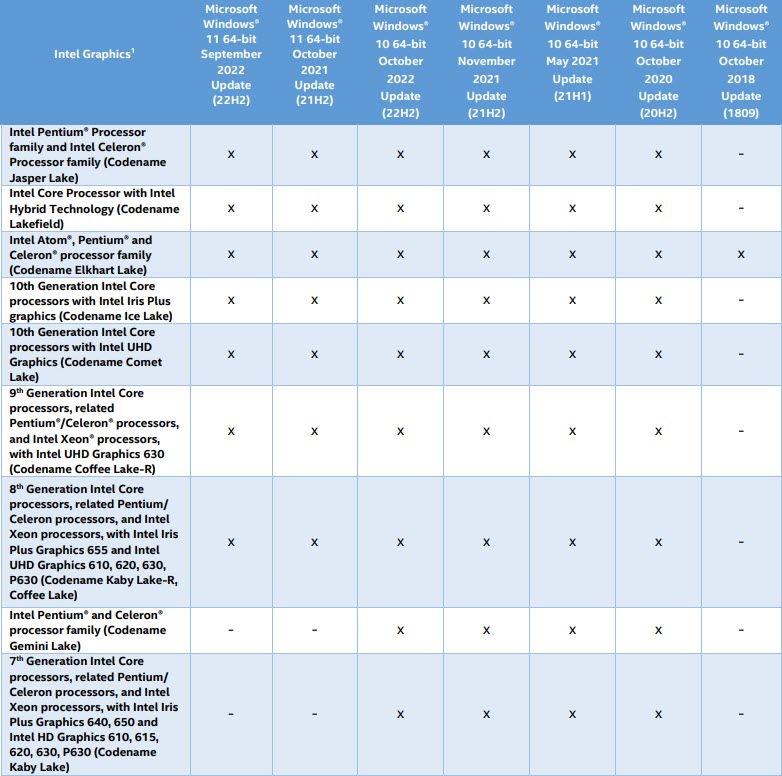
Legacy branches support 7th–10th Gen processors.
How to Download and Install
1. Install the Intel Driver & Support Assistant from Intel’s official site, or open the Intel Download Center.
2. Let the assistant scan your system and recommend the correct driver branch.
3. Download the recommended driver (choose stable for reliability or beta for the newest features).
4. Run the installer, choose a clean installation, and restart if prompted.
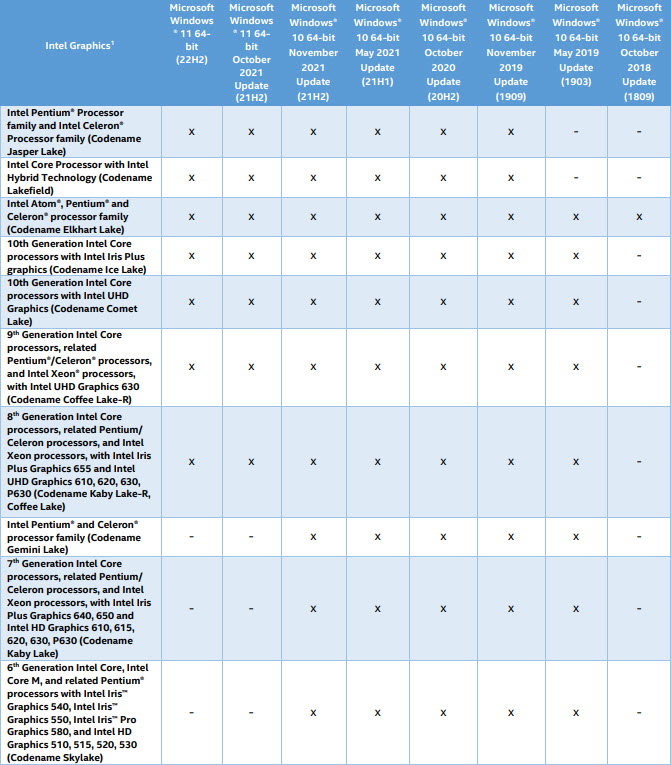
Older 6th–10th Gen processors use a separate legacy driver.
Warning: Download Intel graphics drivers only from Intel’s official site or the Driver & Support Assistant.
Tip: If your laptop maker offers a customised Intel driver, prefer it — OEM drivers can include device-specific fixes.
Troubleshooting
Problem: You are not sure which branch to use.
Solution: Run the Intel Driver & Support Assistant — it detects your GPU and recommends the right driver automatically.
Problem: The generic Intel installer is blocked on a laptop.
Solution: Your OEM controls the driver. Download the matching version from your laptop manufacturer’s support page.
Problem: Stability problems on a beta driver.
Solution: Switch to the latest stable driver for your branch and perform a clean installation.
Problem: Display issues after updating.
Solution: Roll back via Device Manager > Display adapters > Properties > Driver > Roll Back Driver, or reinstall cleanly.
Conclusion
Matching your Intel graphics driver to your GPU branch is the key to smooth performance. Use the Intel Driver & Support Assistant to identify and install the right driver, and choose stable releases unless you specifically need beta features.
</w:pBdr><w:spacing w:before="220" w:after="40"/></w:pPr><w:r><w:rPr><w:b/><w:bCs/><w:color w:val="0B5394"/><w:sz w:val="21"/><w:szCs w:val="21"/><w:rFonts w:ascii="Calibri" w:cs="Calibri" w:eastAsia="Calibri" w:hAnsi="Calibri"/></w:rPr><w:t xml:space="preserve">About TechHub
This guide is part of the TechHub Knowledge Base. For more step-by-step IT guides and support, visit techhub.com.lk.