Overview
Windows 11 version 25H2 කියන්නේ Microsoft's 2025 annual feature update එක — 2025 සැප්තැම්බර් 30 එදා release වුණා. ලොකු rebuild එකක් වෙනුවට, 25H2 එන්නේ 24H2 servicing branch එක උඩට කුඩා enablement package එකක් විදිහට, ඒ නිසා update එක ඉක්මනට install වෙනවා. මේ guide එකෙන් 25H2 එකේ මොකද වෙනස් වුණේ, official ISO එක download කරන ආකාරය, සහ install හෝ upgrade කරන ආකාරය පැහැදිලි කරනවා.
Windows 11 version 25H2 කියන්නේ 2025 annual feature update එක.
Key Takeaways
- 25H2 2025 සැප්තැම්බර් 30 එදා release වුණා, 24H2 එක්ක servicing branch එක share කරනවා.
- Eligible 24H2 systems වල කුඩා enablement package එකකින් (KB 200ක් විතර) install වෙනවා, ඒ නිසා upgrade එක වේගවත්.
- 25H2 ලොකු අලුත් consumer features වලට වඩා security සහ enterprise management වලට focus කරනවා.
- 25H2 install කරන එකෙන් ඔබේ device එකේ support lifecycle clock එක reset කරනවා.
Windows 11 25H2 එකේ මොකද වෙනස් වුණේ
25H2 ලොකු අලුත් consumer features ගේන්නේ නෑ. වඩාත් කැපී පෙනෙන changes:
- Security — development එකේදී vulnerability detection වැඩිදියුණු කරලා, smart-card authentication vulnerabilities වලට hardening.
- Feature removals — security හේතූන් නිසා PowerShell 2.0 සහ legacy WMIC (Windows Management Instrumentation command-line) අයින් කරලා.
- Enterprise additions — Wi-Fi 7 support, Enterprise/Education editions වල Group Policy හෝ Intune එකෙන් pre-installed Microsoft Store apps remove කරන්න පුළුවන්කම, සහ වැඩිදියුණු management controls.
- Support lifecycle reset — 25H2 install කරන එකෙන් support window එක restart කරනවා (Home/Pro වලට මාස 24, Enterprise/Education වලට මාස 36).
Note: 25H2 24H2 branch එකේ enablement package එකක් පාවිච්චි කරන නිසා, eligible PCs එක restart එකකින් minutes කිහිපයකින් update වෙනවා — full OS reinstall එකක් නෑ.
Method 1 — Microsoft එකෙන් ISO එක Download කරන්න
1. Microsoft's official Windows 11 download page එකට යන්න (microsoft.com/software-download/windows11).
2. "Download Windows 11 Disk Image (ISO) for x64 devices" යටතේ Windows 11 (multi-edition ISO) select කරන්න.
3. Download click කරලා, product language එක තෝරලා confirm කරන්න.
4. 25H2 ISO එක save කරන්න 64-bit Download button එක click කරන්න.
Warning: Windows 11 download කරන්නේ microsoft.com එකෙන් විතරයි. Unofficial හෝ "pre-activated" images avoid කරන්න — ඒවා unsafe වෙන්න පුළුවන්.
Method 2 — Media Creation Tool සහ Installation Assistant
- Media Creation Tool — 25H2 direct USB drive එකකට write කරන්න හෝ ISO එකක් save කරන්න එම Microsoft page එකෙන් download කරන්න.
- Installation Assistant — compatible PC එකක් in-place upgrade කරන්න Microsoft එකෙන් download කරන්න, files සහ apps තියාගෙන.
Method 3 — Windows Update එකෙන් Install කරන්න
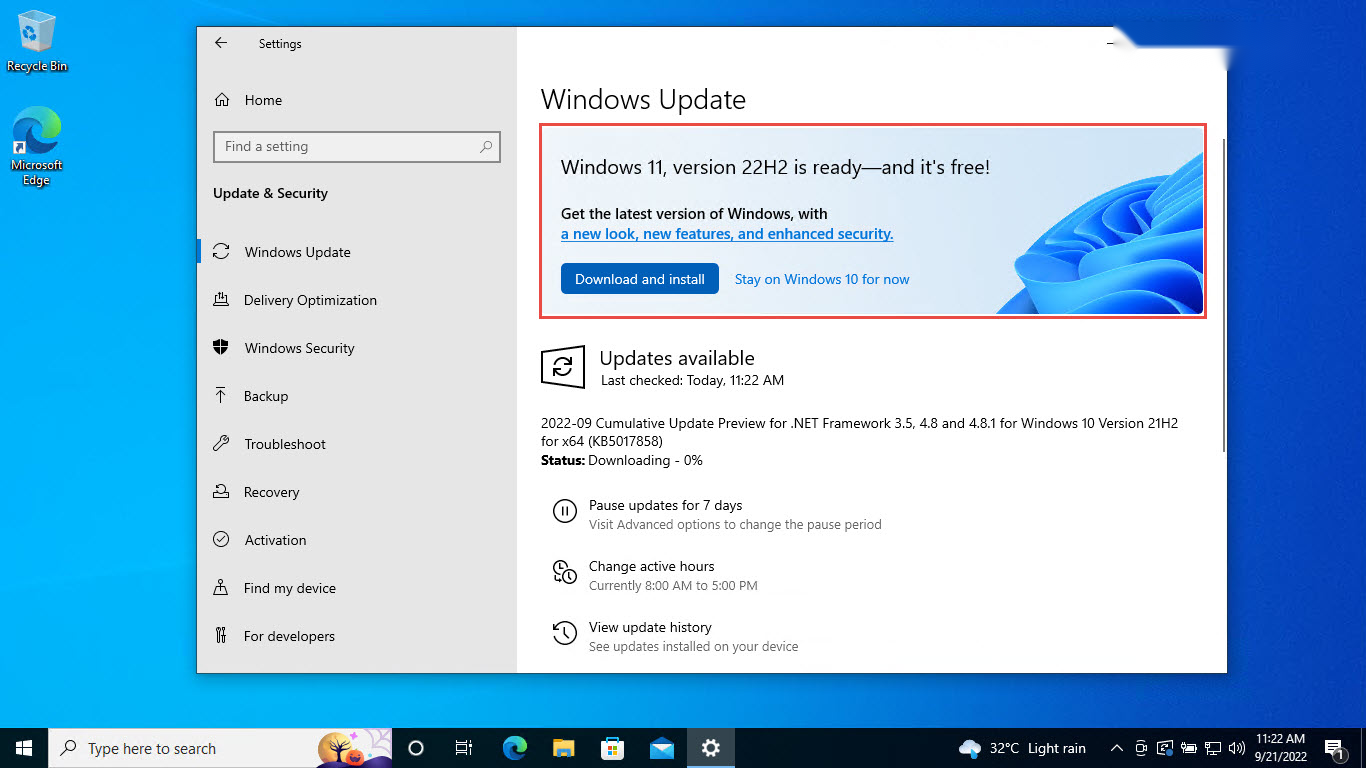
1. Settings > Windows Update open කරන්න.
2. ඉක්මනට ඕන නම් "Get the latest updates as soon as they're available" on කරන්න.
3. Check for updates click කරන්න; PC එක eligible නම්, 25H2 feature update එක offer කරනවා.
4. Download and install click කරලා, prompt වුණාම restart කරන්න.
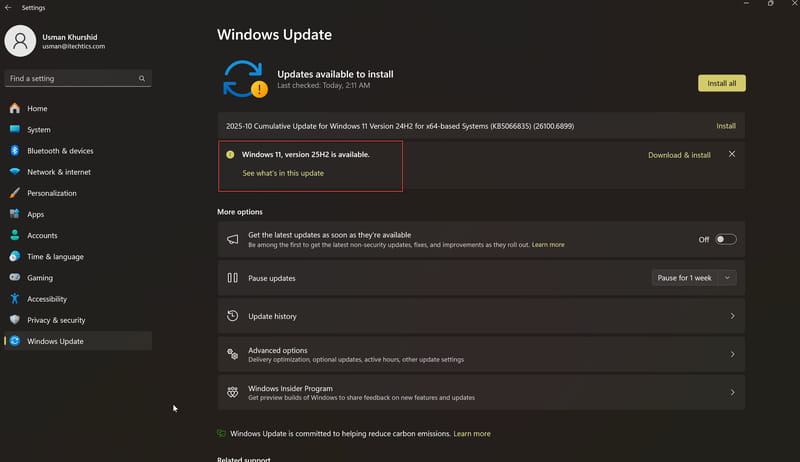
Eligible PCs වලට Windows Update එකෙන් Windows 11 25H2 offer කරනවා.
System Requirements
- Processor: supported 64-bit CPU එකක cores 2+ එක්ක 1 GHz හෝ වේගවත්.
- Memory: අඩුම 4 GB RAM.
- Storage: 64 GB හෝ ලොකු.
- Firmware: Secure Boot එක්ක UEFI, එක්කම TPM 2.0.
- Graphics: WDDM 2.0 driver එකක් එක්ක DirectX 12 compatible.
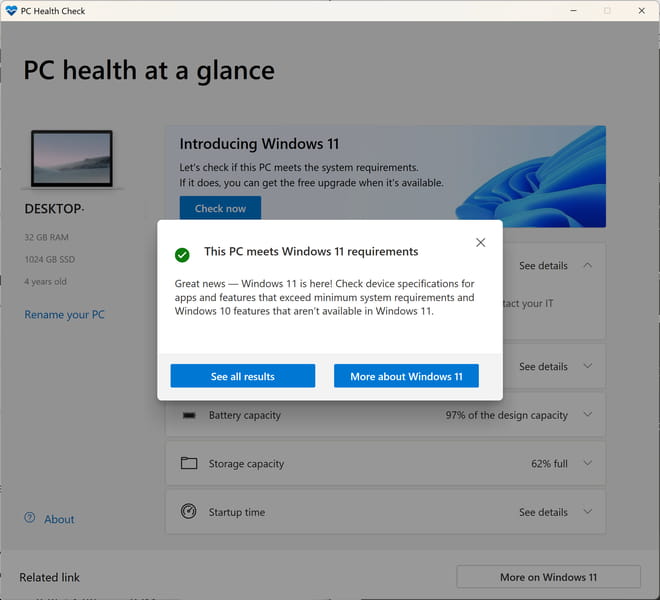
25H2 compatibility confirm කරන්න PC Health Check tool එක පාවිච්චි කරන්න.
ISO එකෙන් Install කරන්න
- In-place upgrade — File Explorer එකේ ISO එක open (mount) කරලා setup.exe run කරලා files සහ apps තියාගෙන upgrade කරන්න.
- Clean install — Media Creation Tool, Rufus, හෝ Ventoy එකෙන් bootable USB එකක් හදලා, ඒකෙන් boot කරලා, fresh install වලට Custom තෝරන්න.
Troubleshooting
Problem: Windows Update එකේ 25H2 offer වෙන්නේ නෑ.
Solution: PC එක 24H2 වලට fully updated ද, requirements සම්පූර්ණ කරනවද බලන්න. "Get the latest updates as soon as they're available" enable කරන්න, නැත්නම් Installation Assistant හෝ ISO එක පාවිච්චි කරන්න.
Problem: Upgrade කළාට පස්සේ script එකක් හෝ tool එකක් වැඩ නවතිනවා.
Solution: 25H2 PowerShell 2.0 සහ WMIC අයින් කරනවා. Scripts PowerShell 5.1/7 වලට update කරලා, WMIC commands equivalent CIM/PowerShell cmdlets වලට replace කරන්න.
Problem: PC එක requirements සම්පූර්ණ කරන්නේ නෑ.
Solution: පුළුවන් නම් UEFI firmware එකේ TPM 2.0 සහ Secure Boot enable කරලා, PC Health Check ආපහු run කරන්න.
Problem: ISO එකෙන් in-place upgrade fail වෙනවා.
Solution: Boot කරනවා වෙනුවට Windows ඇතුළෙන් ISO එක mount කරලා setup.exe run කරන්න, ප්රමාණවත් free disk space තියෙනවා කියලා බලන්න.
Conclusion
Windows 11 25H2 කියන්නේ 24H2 systems වල ඉක්මනට install වෙන, ඔබේ support clock එක reset කරන light, security-focused update එකක්. ගොඩක් users ලාට ලේසිම path එක Windows Update; clean installs හෝ repairs වලට, Microsoft එකෙන් official ISO එක download කරන්න.
About TechHub
මේ guide එක TechHub Knowledge Base එකේ කොටසක්. තව step-by-step IT guides සහ support වලට techhub.com.lk එකට යන්න.