Overview
Windows Security එක blank/white screen එකකට open වෙනවා නම්, ඒකේ app එක හෝ underlying components damage වෙලා තියෙන්න බොහෝ ඉඩ තියෙනවා — බොහෝ විට third-party antivirus එකක් හෝ corrupt system files නිසා. මේ guide එකෙන් ඒක step by step restore කරනවා.
Blank Windows Security screen එකක් fix කිරීම.
Key Takeaways
- Blank page එකක් සාමාන්යයෙන් කියන්නේ app එක හෝ components corrupt බවයි.
- මුලින්ම Windows Security app එක repair/reset කරන්න.
- Third-party antivirus එකකින් Windows Security disable කරන්න පුළුවන්.
- SFC/DISM සහ re-registration වලින් ගැඹුරු issues fix වෙනවා.
Fix 1: Restart and Update
1. Transient glitches clear කරන්න PC එක restart කරන්න.
2. Settings > Windows Update හරහා pending updates install කරන්න.
3. Windows Security නැවත open කරන්න.
Fix 2: Repair or Reset the App
1. Settings > Apps > Installed apps open කරන්න.
2. "Windows Security" හොයාගෙන, three dots > Advanced options click කරන්න.
3. Repair click කරන්න; ඒක fail වුණොත් Reset click කරන්න.
4. App එක නැවත open කරන්න.
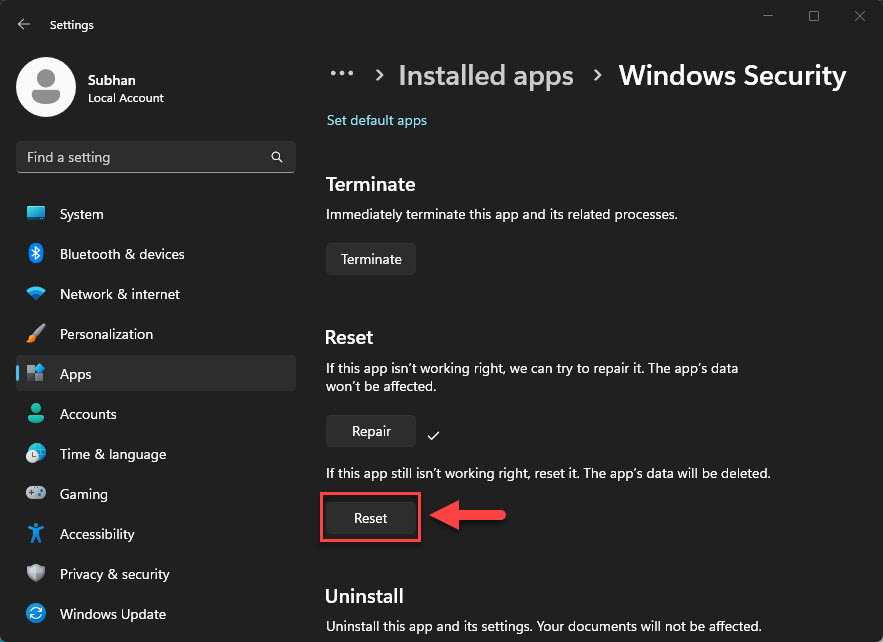
Windows Security app එක reset කරන්න.
Fix 3: Remove Conflicting Antivirus
1. Windows Security disable කරන්න ඇති third-party antivirus එකක් තියෙනවා නම් ඒක uninstall කරන්න.
2. Reboot කරන්න; Windows Security ආපහු activate වෙන්න ඕන.
3. ඔයාට තවම ඕන නම් AV එක පස්සේ නැවත install කරන්න.
Fix 4: Repair System Files
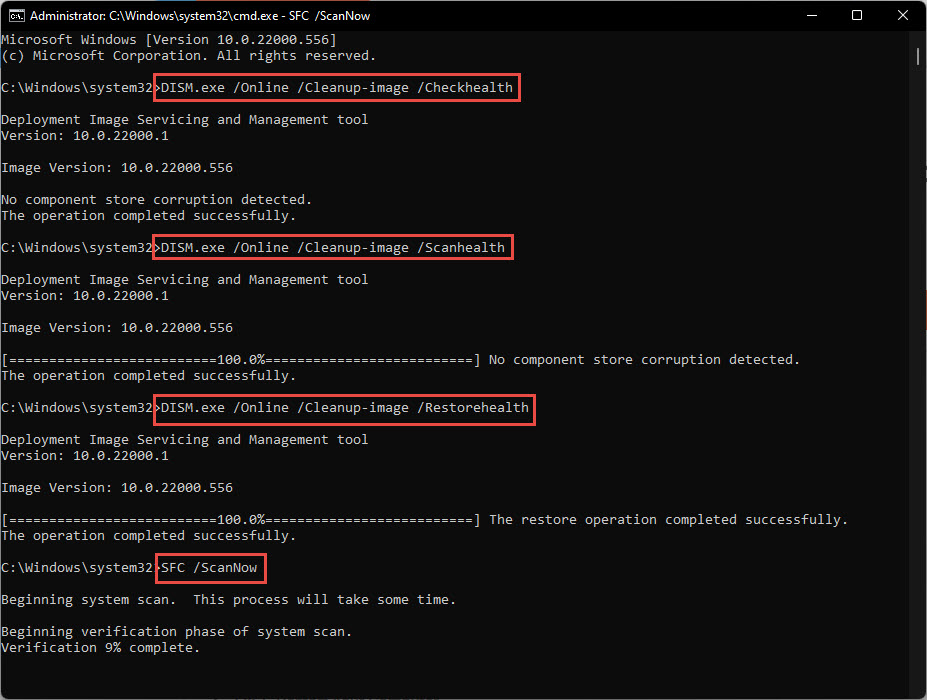
1. Command Prompt එක administrator විදිහට open කරන්න.
2. Run: sfc /scannow
3. ඊට පස්සේ: DISM /Online /Cleanup-Image /RestoreHealth
4. Restart කරලා ආපහු try කරන්න.
Fix 5: Re-register the Security App
1. PowerShell එක administrator විදිහට open කරන්න.
2. Run: Get-AppxPackage Microsoft.SecHealthUI -AllUsers | Reset-AppxPackage (හෝ ඒකේ manifest එක පාවිච්චි කරලා Add-AppxPackage එකෙන් re-register කරන්න).
3. Restart කරලා Windows Security නැවත open කරන්න.
Troubleshooting
Problem: Repair/Reset options නැති වෙලා.
Solution: PowerShell re-register command එක පාවිච්චි කරලා reboot කරන්න.
Problem: AV එක ඉවත් කළාට පස්සෙත් Security off වෙලා තියෙනවා.
Solution: Leftovers clear කරන්න AV vendor එකේ removal tool එක run කරලා reboot කරන්න.
Problem: SFC/DISM වලින් පස්සෙත් තවම blank.
Solution: System files register කරලා Security app එක නැවත install කරන්න; last resort එකක් විදිහට files තියාගෙන Windows reset කරන්න.
Problem: Blank වෙනුවට "Page not available".
Solution: Security Center service (wscsvc) සහ Microsoft Defender services run වෙනවද කියලා සහතික කරගන්න.
Conclusion
Blank Windows Security screen එකක් හැමවිටම වගේ repair කරන්න පුළුවන් app/component issue එකක්. App එක reset කරන්න, conflicting antivirus ඉවත් කරන්න, සහ SFC/DISM වලින් system files repair කරන්න — ඕන නම් app එක re-register කරන්න — ඔයාගේ protection dashboard එක ආපහු ගන්න.
About TechHub
මේ guide එක TechHub Knowledge Base එකේ කොටසක්. තව step-by-step IT guides සහ support වලට techhub.com.lk එකට යන්න.