













Overview
Windows Security එකෙන් "Local Security Authority protection is off" කියලා warn කරන්න පුළුවන් — සමහරවිට ඔබ ඒක on කළාට පස්සෙත් warning එක තියෙනවා හෝ enable වෙන්නේ නෑ. LSA protection එකෙන් ඔබේ credentials guard කරනවා, ඒ නිසා fix කරන එක වටිනවා. මේ guide එකෙන් ඒ ආකාරය පෙන්නනවා.
Windows Security එකේ Local Security Authority (LSA) protection warning එක.
Key Takeaways
- LSA protection එකෙන් untrusted code ඔබේ credentials හොරකම් කරන එක වළක්වනවා.
- Windows Security > Device security > Core isolation එකේ enable කරලා, restart කරන්න.
- Known bug එකකින් false "off" warning එකක් ඇති කළා — අදාළ update එක install කරලා fix වෙනවා.
- System files repair කරන එකෙන් lingering false warnings clear වෙනවා.
Fix 1 — LSA Protection හරියට Enable කරන්න
1. Windows Security > Device security > Core isolation details open කරන්න.
2. Local Security Authority protection on කරන්න.
3. PC එක restart කරන්න — setting එක effect වෙන්නේ reboot එකකට පස්සේ විතරයි.
4. Restart කළාට පස්සේ warning එක ආපහු check කරන්න.
Fix 2 — අදාළ Windows Update එක Install කරන්න
1. Windows update එකක් (KB5007651 era එක විතර) false LSA "off" warning එක fix කළා.
2. Settings > Windows Update open කරලා pending updates ඔක්කොම install කරන්න.
3. Restart කරලා Windows Security ආපහු check කරන්න.
Fix 3 — Registry එකෙන් Enable කරන්න
Warning: මුලින් registry එක backup කරන්න.
1. regedit open කරලා HKEY_LOCAL_MACHINE\SYSTEM\CurrentControlSet\Control\Lsa වලට යන්න.
2. RunAsPPL කියන DWORD එකක් හදලා 1 කරන්න (හෝ UEFI-locked වලට 2).
3. LSA protection enable කරන්න PC එක restart කරන්න.
Fix 4 — Windows Repair කරන්න
1. Command Prompt එක administrator විදිහට open කරන්න.
2. Run: DISM /Online /Cleanup-Image /RestoreHealth
3. Run: sfc /scannow
4. Restart කරන්න — මේකෙන් false warning එකට හේතු වෙන්න පුළුවන් corruption clear කරනවා.
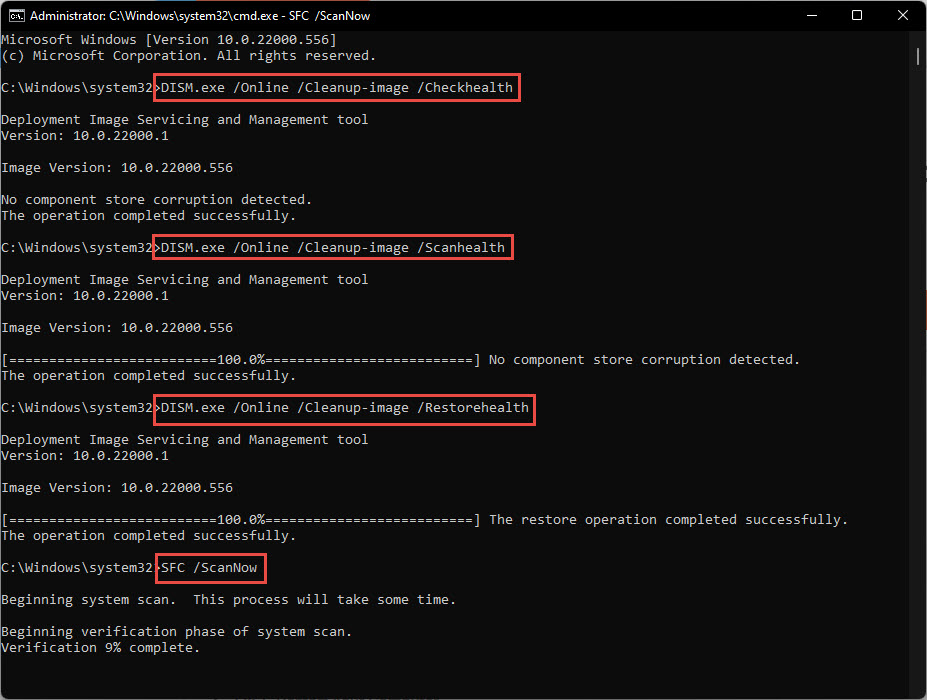
Lingering warnings clear කරන්න Windows system files repair කරන්න.
Troubleshooting
Problem: Enable කළාට පස්සේ warning එක ආපහු එනවා.
Solution: Restart කළාද බලලා (ඒක reboot එකකට පස්සේ විතරයි apply වෙන්නේ), fixing Windows update එක install කරලා, false alert එක clear කරන්න SFC/DISM run කරන්න.
Problem: LSA protection on වෙන්නේ නෑ.
Solution: Incompatible driver එකක් block කරන්න පුළුවන්; flagged drivers update/remove කරන්න, නැත්නම් registry එකෙන් RunAsPPL set කරලා restart කරන්න.
Problem: ඒක ඇත්තටම off සහ risky.
Solution: Credentials protect කරන්න enable කරන්න; critical app එකක් incompatible නම් විතරයි off තියලා, හැකි ඉක්මනට ආපහු enable කරන්න.
Problem: Dismiss කරපු warning එකක් ආපහු ආපහු එනවා.
Solution: ඒ known Windows bug එකක් — Windows fully update කරන්න, ඒකෙන් false notification එක resolve වෙනවා.
Conclusion
LSA protection warning එක feature එක enable කරලා (restart කරලා), අදාළ Windows update එක install කරලා, system files repair කරලා fix වෙනවා. LSA protection on තියාගන්න — ඒක ඔබේ credentials වලට වැදගත් defence එකක්.
About TechHub
මේ guide එක TechHub Knowledge Base එකේ කොටසක්. තව step-by-step IT guides සහ support වලට techhub.com.lk එකට යන්න.





