Overview
Windows optional features (.NET 3.5, Hyper-V, හෝ OpenSSH client වගේ) සමහර වෙලාවට install වෙන්නේ නැහැ, බොහෝ විට අපැහැදිලි errors එක්ක. හේතු metered connection එකක ඉඳන් corrupted system files දක්වා විහිදෙනවා. මේ guide එකෙන් fixes අනුපිළිවෙළින් කරගෙන යනවා, ඒ නිසා ඔයාට Windows නැවත install නොකර feature එක install කරගන්න පුළුවන්.
Optional features කිහිප වර්ගයක fixable හේතු නිසා install වෙන්නේ නැති වෙන්න පුළුවන්.
Key Takeaways
- බොහෝ optional features on demand download වෙනවා, ඒ නිසා connection සහ Windows Update issues ඒවා block කරනවා.
- Metered connection එකක් හෝ "Hide features" policy එකක් install වෙන එක වළක්වන්න පුළුවන්.
- DISM සහ SFC වලින් system files repair කරද්දී corruption-related failures fix වෙනවා.
- GUI එක fail වුණාම PowerShell වලින් බොහෝ features කෙලින්ම install කරන්න පුළුවන්.
Pre-Troubleshooting Checks
- ඔයා internet එකට connect වෙලාද කියලා තහවුරු කරගන්න — බොහෝ features Windows Update එකෙන් download වෙනවා.
- ඔයා administrator විදිහට sign in වෙලාද කියලා තහවුරු කරගන්න.
- ගැඹුරු steps වලට කලින් PC එක එක පාරක් restart කරලා ආපහු try කරන්න.
Fix 1 — Metered Connection එක Disable කරන එක
1. Settings > Network & Internet open කරලා ඔයාගේ active connection එක තෝරන්න.
2. Metered connection එක off කරන්න.
3. Optional feature එක install කරන්න ආපහු try කරන්න — metered connections on-demand downloads block කරනවා.
Fix 2 — "Hide Windows Features" Policy එක Disable කරන එක
1. Windows key + R press කරලා, gpedit.msc type කරලා, Enter press කරන්න (Pro/Enterprise).
2. User Configuration > Administrative Templates > Control Panel > Programs එකට යන්න.
3. "Hide Windows Features" එක Disabled හෝ Not Configured කරලා, OK click කරන්න.
Fix 3 — Windows Module Installer Service එක Restart කරන එක
1. Windows key + R press කරලා, services.msc type කරලා, Enter press කරන්න.
2. Windows Modules Installer හොයාගෙන, right-click කරලා, Restart තෝරන්න (Startup type එක Manual හෝ Automatic කරන්න).
3. Windows Update service එකත් run වෙනවා කියලා තහවුරු කරලා, ආපහු try කරන්න.
Fix 4 — Windows Update Troubleshooter එක Run කරන එක
1. Settings > System > Troubleshoot > Other troubleshooters open කරන්න.
2. Windows Update troubleshooter එක run කරලා fixes apply කරන්න.
3. Restart කරලා feature එක ආපහු try කරන්න.
Fix 5 — DISM සහ SFC වලින් System Files Repair කරන එක
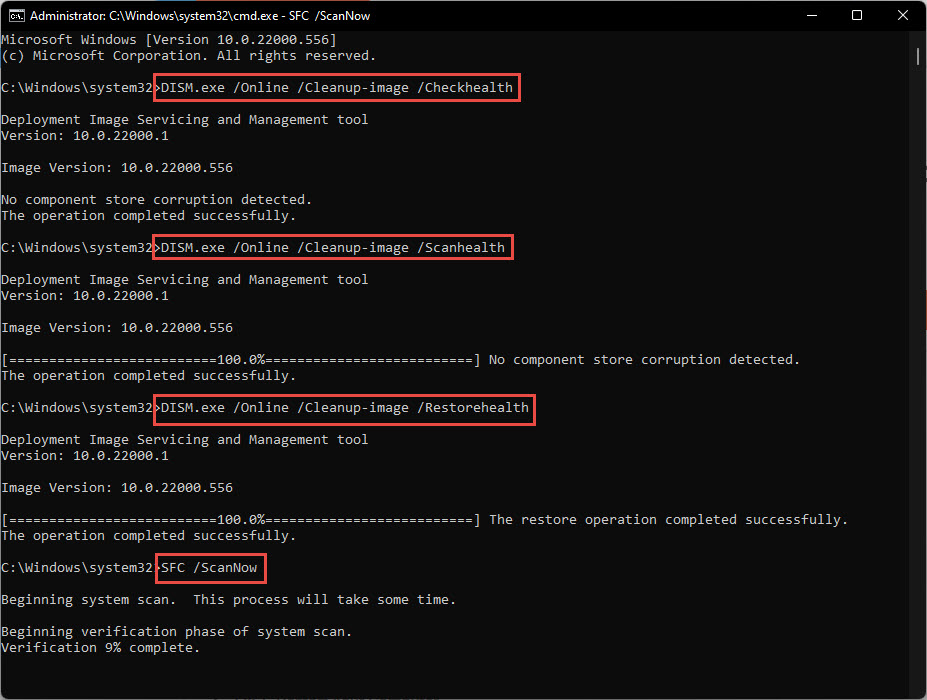
1. Command Prompt එක administrator විදිහට open කරන්න.
2. මේක run කරන්න: DISM /Online /Cleanup-Image /RestoreHealth
3. ඊට පස්සේ මේක run කරන්න: sfc /scannow
4. දෙකම complete වුණාම PC එක එක පාරක් restart කරන්න.

DISM සහ SFC වලින් Windows system files repair කරන්න.
Fix 6 — Windows Update Components Reset කරන එක
1. Command Prompt එක administrator විදිහට open කරන්න.
2. Services නවත්තන්න: net stop wuauserv සහ net stop bits
3. SoftwareDistribution folder එක rename කරන්න (උදා. ren C:\Windows\SoftwareDistribution SoftwareDistribution.old).
4. Services ආපහු start කරන්න: net start wuauserv සහ net start bits, ඊට පස්සේ ආපහු try කරන්න.
Fix 7 — PowerShell වලින් Feature එක Install කරන එක
1. PowerShell එක administrator විදිහට open කරන්න.
2. Built-in features වලට: Enable-WindowsOptionalFeature -Online -FeatureName "FeatureName" -All
3. Capabilities වලට (OpenSSH වගේ): Add-WindowsCapability -Online -Name "Capability~~~~Version"
4. Prompt කරොත් restart කරන්න.
Troubleshooting
Problem: Feature එක තාමත් error 0x800f0954 හෝ ඒ වගේ එකකින් fail වෙනවා.
Solution: මේක බොහෝ විට Windows Update source issue එකක්. Windows Update components reset කරන්න (Fix 6), නැත්නම් Group Policy හරහා තාවකාලිකව Windows Update එකෙන් downloads වලට ඉඩ දෙන්න.
Problem: විශේෂයෙන් .NET 3.5 fail වෙනවා.
Solution: Media එකේ sources\sxs folder එකට point කරන /Source option එක එක්ක DISM /Online /Enable-Feature පාවිච්චි කරලා Windows installation media එකෙන් ඒක install කරන්න.
Problem: DISM එකට source files හොයාගන්න බැහැ කියලා report කරනවා.
Solution: /Source switch එකෙන් known-good source එකක් දෙන්න, නැත්නම් component store එක repair කරන්න මුලින්ම Windows Update run කරන්න.
Problem: Feature එක list එකෙන් සම්පූර්ණයෙන්ම නැහැ.
Solution: Policy එකක් features hide කරනවා වෙන්න පුළුවන් (Fix 2), නැත්නම් ඔයාගේ Windows edition එකේ feature එක available නැහැ.
Conclusion
Optional-feature failures බොහෝ විටම fixable. මුලින්ම connection සහ policy blocks clear කරන්න, ඊට පස්සේ DISM සහ SFC වලින් system files repair කරන්න, ඒත් වැඩ නැත්නම් feature එක කෙලින්ම install කරන්න PowerShell එකට fall back වෙන්න — reinstall එකක් අවශ්ය නැහැ.
About TechHub
මේ guide එක TechHub Knowledge Base එකේ කොටසක්. තව step-by-step IT guides සහ support වලට techhub.com.lk එකට යන්න.