













Overview
PuTTY’s "Network Error: Connection Timed Out" means it could not reach the SSH server. The cause is usually a wrong address/port, the SSH service not running, or a firewall blocking the connection. This guide works through the fixes.
PuTTY times out when it cannot reach the SSH server.
Key Takeaways
- Confirm the host address and port (default SSH is 22).
- Make sure the SSH server/service is running on the target.
- Check that a firewall or antivirus is not blocking the connection.
- Test reachability with ping and a port check.
Why It Happens
- Incorrect IP/hostname or port in PuTTY.
- SSH (sshd) service not running on the server.
- A firewall (on either end) or the network blocks port 22.
- The host is offline or unreachable from your network.
Fix 1 — Confirm the Address and Port
1. Double-check the hostname/IP and port in PuTTY (Session settings).
2. Ensure the port matches the server’s SSH port (22 by default).
3. Test reachability: ping the host, and check the port (e.g. with Test-NetConnection host -Port 22 in PowerShell).
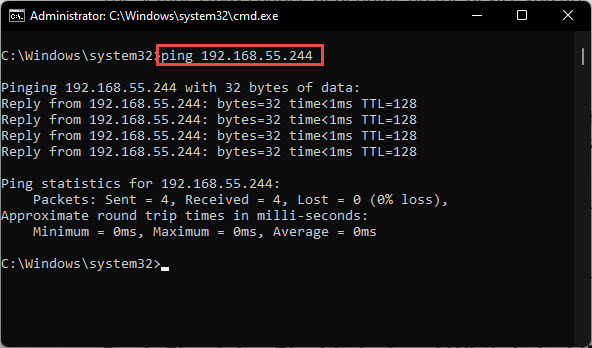
Ping the SSH server to confirm it is reachable.
Fix 2 — Check the SSH Service on the Server
1. On a Linux server: ensure sshd is running (sudo systemctl status ssh / sshd).
2. On Windows (OpenSSH Server): confirm the sshd service is Running.
3. Start the service if it is stopped.
Fix 3 — Check Firewalls and Antivirus
1. On the server, allow inbound TCP port 22 through the firewall.
2. On your PC, temporarily disable third-party antivirus/firewall to test, then add a rule for PuTTY/SSH.
3. Check any network firewall or router that may block the port.
Troubleshooting
Problem: Ping works but PuTTY still times out.
Solution: The host is reachable but the SSH port is blocked or the service is down — open port 22 and start sshd.
Problem: Ping fails too.
Solution: The host is unreachable. Check the IP/hostname, that the device is on, and that you are on the right network/VPN.
Problem: It works locally but not remotely.
Solution: Port forwarding/NAT on the router may be needed, and the public IP/port must be open and correct.
Problem: Connection refused vs timed out.
Solution: "Refused" means the port is closed but reachable (service down); "timed out" means a firewall/network is dropping the packets.
Conclusion
A PuTTY timeout is a connectivity problem: verify the address and port, confirm the SSH service is running, and open the firewall on port 22. Use ping and a port test to pinpoint where the connection is failing.
</w:pBdr><w:spacing w:before="220" w:after="40"/></w:pPr><w:r><w:rPr><w:b/><w:bCs/><w:color w:val="0B5394"/><w:sz w:val="21"/><w:szCs w:val="21"/><w:rFonts w:ascii="Calibri" w:cs="Calibri" w:eastAsia="Calibri" w:hAnsi="Calibri"/></w:rPr><w:t xml:space="preserve">About TechHub
This guide is part of the TechHub Knowledge Base. For more step-by-step IT guides and support, visit techhub.com.lk.





