Windows 11 සහ 10 වල SafeSearch Off නොවීම Fix කරන්නේ කොහොමද
Policies, family settings, හෝ account restrictions නිසා lock වුණු SafeSearch එකක් resolve කරන්න.
Overview
Windows Search SafeSearch එක off වෙන්නේ නැත්නම්, සාමාන්යයෙන් policy එකක්, family/parental setting එකක්, හෝ account restriction එකක් මේක enforce කරනවා. මේ guide එකෙන් ඔබ administer කරන PC එකක adult accounts සඳහා legitimate fixes ආවරණය කරනවා.
Off නොවෙන SafeSearch එකක් fix කිරීම.
Note: මේක child හෝ supervised account එකක් නම්, SafeSearch එක Family Safety එකෙන් හිතාමතාම lock කරලා තියෙන්න පුළුවන් — ඒක intended protection එකක් වන අතර, managing parent/admin විසින් විතරක් වෙනස් කළ යුතුයි.
Key Takeaways
- Windows Search වල SafeSearch එක Privacy & security යටතේ set වෙනවා.
- Group Policy එකකට හෝ Registry value එකකට එය lock කරන්න පුළුවන්.
- Family Safety/child accounts එය හිතාමතාම enforce කරනවා.
- Corrupt system files වලිනුත් අමුතු behaviour ඇති වෙන්න පුළුවන්.
Fix 1: The Windows Setting
1. Settings > Privacy & security > Search permissions open කරන්න.
2. "SafeSearch" යටතේ, Off (හෝ Moderate) තෝරන්න.
3. එය ආපහු revert වෙනවා නම්, policy එකක් override කරනවා — පහත බලන්න.
Fix 2: Group Policy
1. gpedit.msc run කරන්න (Pro/Enterprise).
2. Windows Components යටතේ Search policies වලට browse කරන්න.
3. ඕනෑම "SafeSearch" enforcement policy එකක් Not Configured/Disabled කරන්න.
4. gpupdate /force run කරන්න.
SafeSearch policy එක adjust කිරීම.
Fix 3: Registry
Warning: Registry එක වැරදියට edit කිරීම problems ඇති කරන්න පුළුවන්. මුලින්ම Registry එක back up කරන්න.
1. regedit open කරලා Windows Search policy key එකට යන්න (HKCU/HKLM Software\Policies\Microsoft\Windows\Windows Search).
2. "SafeSearchMode" value එක adjust/remove කරන්න.
3. Sign out වෙලා ආපහු sign in වෙන්න.
Fix 4: Family Safety and System Files
1. Microsoft Family Safety check කරන්න — child account එකකට, managing parent විසින් web filtering වෙනස් කළ යුතුයි.
2. SafeSearch force කරන third-party antivirus web filters තාවකාලිකව disable කරන්න.
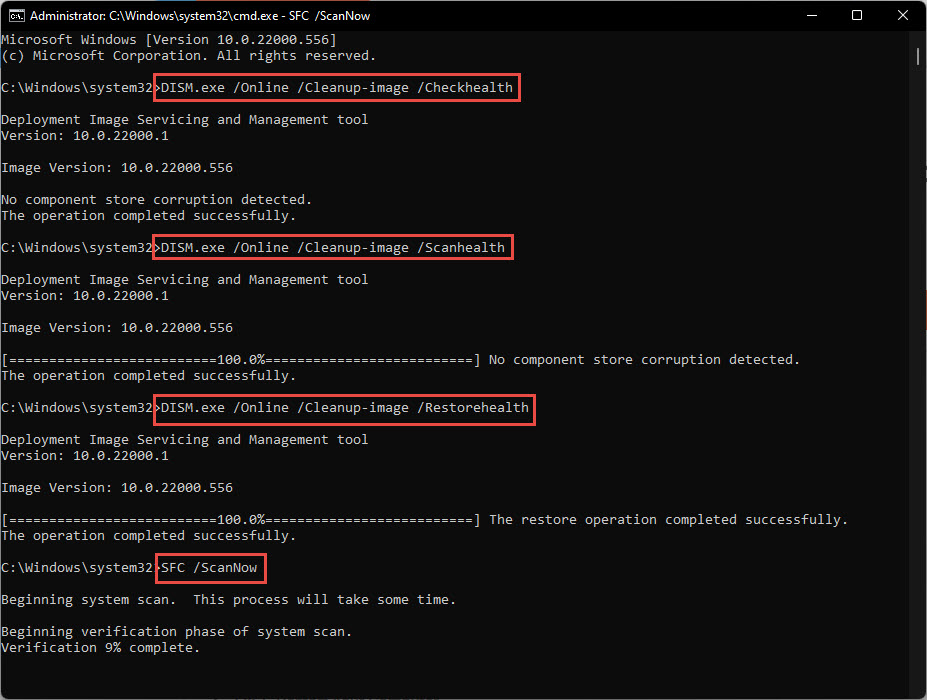
3. Setting එක අමුතු විදිහට behave කරනවා නම්, corrupt system files repair කරන්න sfc /scannow run කරන්න.
Troubleshooting
Problem: Setting එක වහාම revert වෙනවා.
Solution: Group Policy/Registry value එකක් එය enforce කරනවා — policy එක clear කරලා gpupdate කරන්න.
Problem: ඒක child account එකක්.
Solution: Family Safety එය හිතාමතාම lock කරනවා; managing parent විසින් Family portal එකේ web filtering වෙනස් කරනවා.
Problem: AV එකෙන් SafeSearch force කරනවා.
Solution: Antivirus එකේ web/parental filter එක disable කරලා, ආපහු test කරන්න.
Problem: තාම හිරවෙලා.
Solution: SFC/DISM run කරන්න, සහ HKCU සහ HKLM Windows Search policy keys දෙකම check කරන්න.
Conclusion
හිරවුණු SafeSearch එකක් නම් හැමවෙලාවෙම වගේ enforcing policy එකක්, family setting එකක්, හෝ AV filter එකක්. ඔබ administer කරන PC එකක Group Policy/Registry value එක හෝ AV filter එක clear කරන්න — නමුත් children's accounts වල Family Safety locks ගරු කරන්න, ඒවා design එකෙන්ම protective.