Windows එකේ Remote Server Administration Tools (RSAT) Install කරන්නේ කොහොමද
Windows Server roles සහ Active Directory ඔබේ PC එකෙන් manage කරන්න RSAT add කරන්න.
Overview
RSAT (Remote Server Administration Tools) මගින් Windows Server roles සහ features — Active Directory, DNS, DHCP, Group Policy, සහ තවත් — Windows client එකකින් manage කරන්න පුළුවන්. මේ guide එකෙන් ඒක install කරලා access කරන්නේ කොහොමද කියලා පෙන්නනවා.
Remote Server Administration Tools (RSAT).
Note: නවීන Windows 10/11 වල, legacy installers download කරනවා වෙනුවට RSAT එක Features on Demand (built in) හරහා install කරන්න.
Key Takeaways
- RSAT මගින් client PC එකකට server-management consoles ලබා දෙනවා.
- Windows 10 1809+ සහ Windows 11 ඒක Optional Features හරහා install කරනවා.
- පරණ Windows වල downloadable RSAT package එකක් use කරා.
- ADUC, DNS, DHCP, GPMC, සහ තවත් ඇතුළත්.
Install on Windows 10 (1809+) and Windows 11
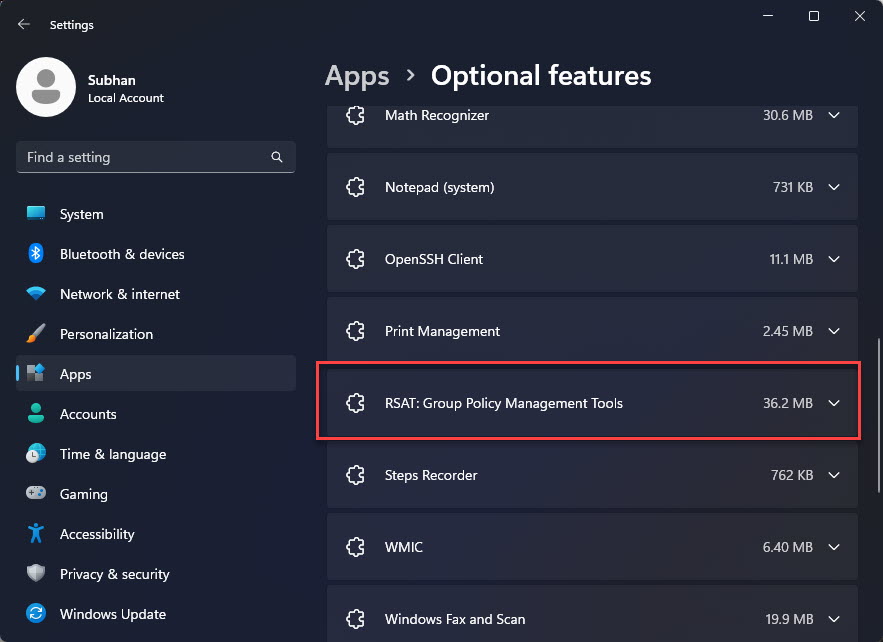
1. Settings > Apps > Optional features > Add an optional feature open කරන්න.
2. "RSAT" search කරන්න.
3. ඔබට ඕන tools තෝරගන්න (උදා: Active Directory DS/LDS Tools, DNS, Group Policy Management).
4. Install click කරලා ඉන්න; reboot එකක් ඕන වෙන්න පුළුවන්.
Install via PowerShell
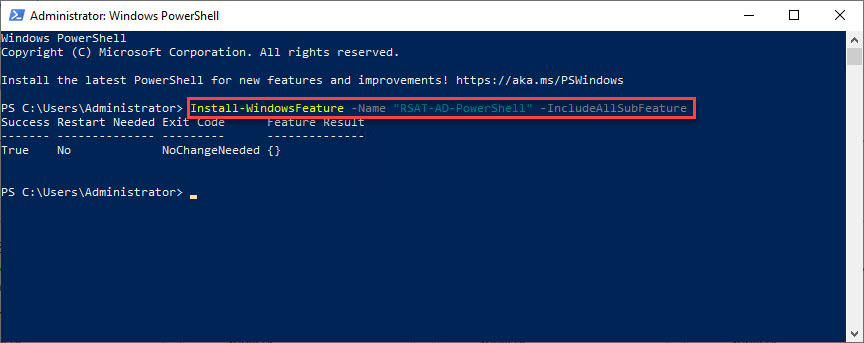
1. PowerShell administrator විදිහට open කරන්න.
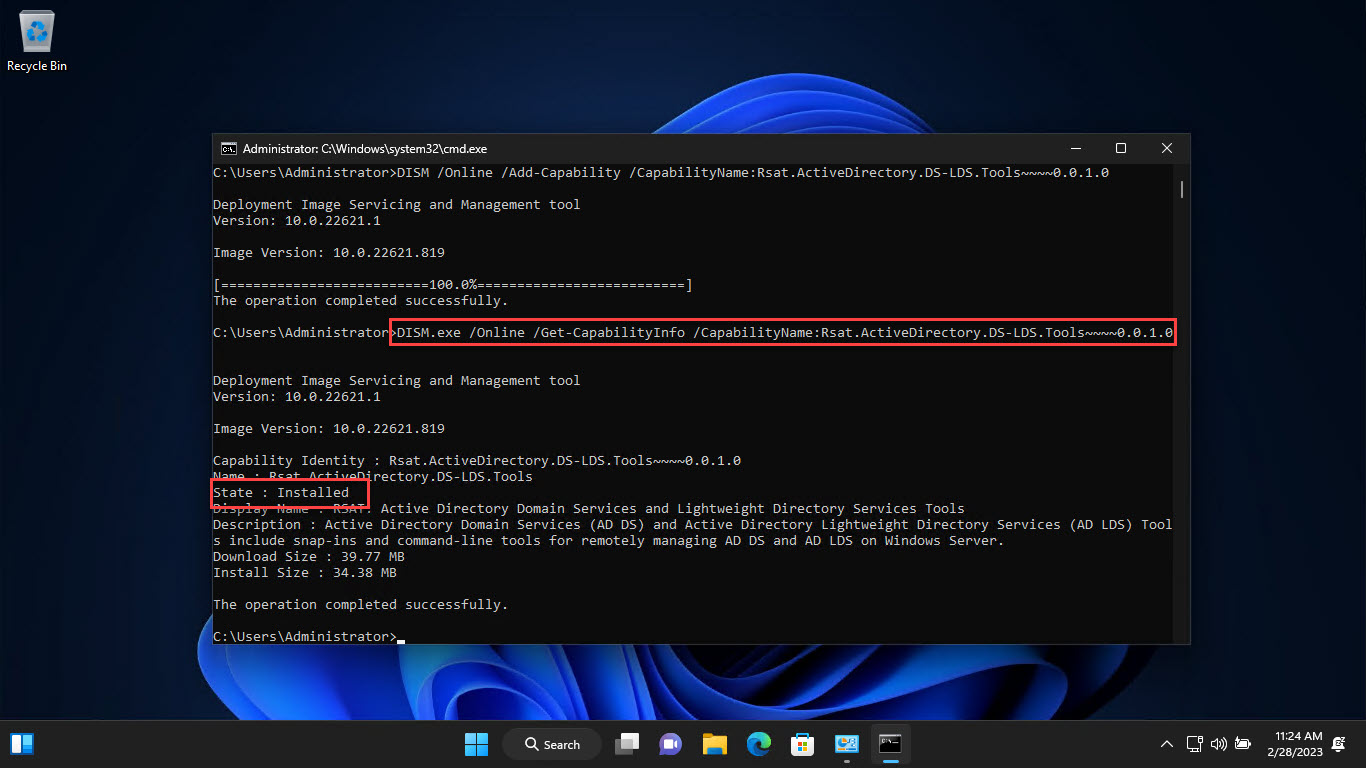
2. RSAT features list කරන්න: Get-WindowsCapability -Online -Name RSAT*
3. එකක් install කරන්න: Add-WindowsCapability -Online -Name "Rsat.ActiveDirectory.DS-LDS.Tools~~~~0.0.1.0"
4. සියල්ල install කරන්න: Get-WindowsCapability -Online -Name RSAT* | Add-WindowsCapability -Online
Older Windows (Downloadable RSAT)
1. Windows 10 1803/ඊට පෙර, 8.1, හෝ 8 සඳහා, ඔබේ version එකට ගැලපෙන RSAT package එක Microsoft ගේ official site එකෙන් download කරන්න.
2. installer එක run කරලා Windows Features වල tools enable කරන්න.
3. RSAT version එක ඔබේ Windows version එකට හරියටම match කරන්න.
Access RSAT Tools
1. Start menu > Windows Tools / Administrative Tools open කරන්න.
2. ඔබට ඕන console එක launch කරන්න (උදා: Active Directory Users and Computers).
3. නැත්නම් ඒවා කෙලින්ම run කරන්න (dsa.msc, dnsmgmt.msc, gpmc.msc).
Troubleshooting
Problem: RSAT features install වෙන්නේ නෑ.
Solution: Windows Update access එක තහවුරු කරගන්න (Features on Demand එන්නේ Windows Update හරහා) සහ administrator විදිහට run කරන්න.
Problem: install කරාට පස්සේ tool එක නෑ.
Solution: Windows Tools/Administrative Tools check කරන්න, නැත්නම් .msc එක කෙලින්ම run කරන්න (උදා: dsa.msc).
Problem: පරණ Windows එකේ වැරදි version එකක්.
Solution: ඔබේ හරියටම Windows version එකට match වෙන RSAT package එක download කරන්න.
Problem: server/domain එකට connect කරන්න බෑ.
Solution: network access, credentials, සහ PC එකට domain controller එකකට reach කරන්න පුළුවන්ද කියලා තහවුරු කරගන්න.
Conclusion
RSAT මගින් ඔබේ Windows client එකට server-management consoles ගෙන එනවා. Windows 10 1809+ සහ Windows 11 වල, ඒක Optional Features හෝ PowerShell හරහා add කරන්න; පරණ versions matching downloadable package එකක් use කරනවා. ඊට පස්සේ ADUC සහ GPMC වගේ tools launch කරලා ඔබේ servers remotely manage කරන්න.