Overview
Intel Graphics DCH driver version 31.0.101.3729 කියන්නේ focused update එකක්. ඒකේ ප්රධාන වෙනස තමයි Intel එකේ 13th Generation (Raptor Lake) processors වලට support එකතු කරන එක. මේ guide එකෙන් release එක සාරාංශ කරලා, Intel එකේ official channels වලින් download කරලා install කරන හැටි පැහැදිලි කරනවා.
Intel DCH driver 31.0.101.3729 එකෙන් 13th Gen (Raptor Lake) support එකතු කරනවා.
Key Takeaways
- ප්රධාන වෙනස තමයි 13th Gen Intel Core (Raptor Lake) processors වලට support එක.
- ඒක DCH driver එකක්, offline installer එකක් විදිහට දෙනවා.
- පරණ 10th Gen සහ ඊට කලින් hardware, legacy 31.0.101.2111 branch එකේම දිගටම යනවා.
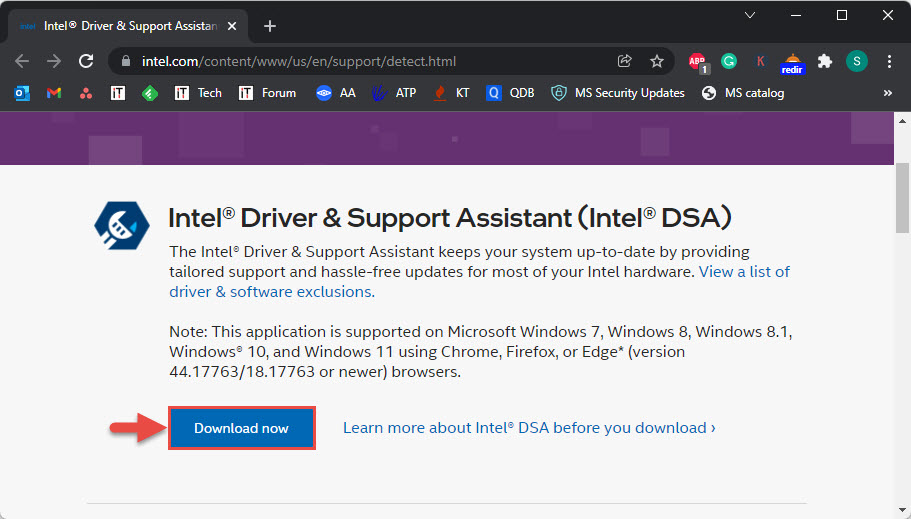
- Intel Driver & Support Assistant එකෙන් නැත්නම් කෙලින්ම Intel එකෙන් install කරන්න.
What’s New
- Intel 13th Generation (Raptor Lake) CPUs සහ ඒවාගේ integrated graphics වලට support එකතු කරනවා.
- මේ release එකේ වෙන ලොකු feature වෙනස්කම් නෑ.
- Legacy processors (10th Gen සහ ඊට පහළ) වෙනම 31.0.101.2111 driver එකේම තියෙනවා.
Note: Update කරාට පස්සේ problems ආවොත්, current known issues වලට Intel එකේ release notes check කරන්න.
How to Download
1. Intel එකේ official Download Center එක නැත්නම් Intel Driver & Support Assistant එක open කරන්න.
2. ඔයාගේ graphics model එක search කරන්න නැත්නම් assistant එකට hardware එක detect කරන්න දෙන්න.
3. ඔයාගේ processor එකට ගැළපෙන 31.0.101.3729 offline installer එක download කරන්න.
4. Install කරන්න කලින් download එක සම්පූර්ණ වුණාද කියලා confirm කරගන්න.
Warning: Intel drivers download කරන්නේ Intel එකේ official site එකෙන් නැත්නම් Intel Driver & Support Assistant එකෙන් විතරයි.
How to Install
1. Download කරපු installer එක run කරලා licence agreement එක accept කරන්න.
2. Offer කරනවා නම්, පරණ driver files remove කරන්න clean installation එකක් තෝරන්න.
3. Installation එක ඉවර වෙන්න දෙන්න; display එක පොඩ්ඩක් flicker වෙන්න පුළුවන්.
4. Prompt කරොත් restart කරලා, version එක verify කරන්න: Device Manager > Display adapters > Properties > Driver.
Note: ගොඩක් laptops වල graphics driver එක සප්පයි කරන්නේ PC manufacturer එකෙන්. Generic Intel installer එක block වුණොත්, ඒ වෙනුවට OEM driver එක use කරන්න.
Supported Systems
- Operating systems: Windows 10 සහ Windows 11 (64-bit).
- Processors: මේ version එකට 13th Gen Intel Core දක්වා; 10th Gen සහ ඊට පහළ 31.0.101.2111 use කරනවා.
Troubleshooting
Problem: Installer එක ඔයාගේ PC එකට validate වෙලා නෑ.
Solution: ඔයාගේ OEM එකෙන් තමයි graphics drivers control කරන්නේ. ඔයාගේ laptop manufacturer එකේ support page එකෙන් ගැළපෙන driver එක download කරන්න.
Problem: Update කරාට පස්සේ display issues.
Solution: Device Manager > Display adapters > Properties > Driver > Roll Back Driver වලින් roll back කරලා, clean විදිහට reinstall කරන්න.
Problem: Driver version එක updated විදිහට පෙන්නන්නේ නෑ.
Solution: Install එක සම්පූර්ණ වුණාද කියලා confirm කරලා restart කරන්න. Device Manager > Display adapters වල version එක check කරන්න.
Problem: Installation එක fail වෙනවා.
Solution: Apps close කරලා, antivirus එක temporary disable කරලා, installer එක administrator විදිහට run කරන්න.
Conclusion
Driver 31.0.101.3729 එකෙන් ප්රධාන වශයෙන් Intel graphics වලට Raptor Lake (13th Gen) support එක ගේනවා. Intel එකේ official channels වලින් clean installation එකකින් install කරන්න, ඕන වුණොත් ලේසියෙන් roll back කරන්නත් පුළුවන්.
About TechHub
මේ guide එක TechHub Knowledge Base එකේ කොටසක්. තව step-by-step IT guides සහ support වලට techhub.com.lk එකට යන්න.