Windows PowerShell vs PowerShell (Core): What’s the Difference?
Understand the two PowerShell editions, how they differ, and when to use each.
Overview
There are two PowerShells: the built-in "Windows PowerShell" (5.1) and the newer cross-platform "PowerShell" (formerly PowerShell Core, 7+). This guide explains how they differ and when to use each — they can run side by side.
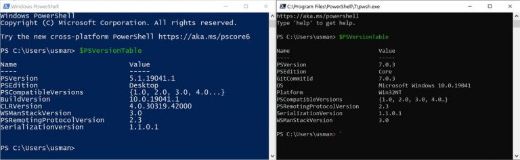
Windows PowerShell vs PowerShell (Core).
Key Takeaways
- Windows PowerShell 5.1 is built into Windows and Windows-only.
- PowerShell 7+ is cross-platform, open-source, and actively developed.
- They install side by side (powershell.exe vs pwsh.exe).
- New scripting should generally target PowerShell 7+.
Windows PowerShell (5.1)
- Ships with Windows; runs on the full .NET Framework.
- Command: powershell.exe.
- Best compatibility with older Windows-only modules.
- No longer getting new features (maintenance only).
PowerShell 7+ (formerly Core)
- Cross-platform (Windows, macOS, Linux); built on modern .NET.
- Command: pwsh.exe.
- Faster, with new operators and features.
- The recommended edition going forward.
Install PowerShell 7 Side by Side
Note: Download PowerShell 7 only from Microsoft’s official source (GitHub releases or winget).
1. Install via winget: winget install Microsoft.PowerShell
2. Or download the MSI from Microsoft’s official PowerShell GitHub releases.
3. It installs as pwsh, alongside the built-in Windows PowerShell 5.1.
4. Launch "PowerShell 7" from Start, or run pwsh.
Which Should You Use?
- New scripts/cross-platform: PowerShell 7+.
- Legacy Windows-only modules that need 5.1: Windows PowerShell.
- Both can coexist — choose per task.
Troubleshooting
Problem: A module works in 5.1 but not 7.
Solution: Some old modules are Windows-PowerShell-only; run them in 5.1 or use the Windows Compatibility feature in PS7.
Problem: pwsh not found.
Solution: Install PowerShell 7 (winget install Microsoft.PowerShell) and open a new terminal.
Problem: Which version am I in?
Solution: Run $PSVersionTable.PSVersion; 5.1 = Windows PowerShell, 7.x = PowerShell (Core).
Problem: Scripts behave differently.
Solution: Test under the target edition; PS7 changed some default behaviours and cmdlet outputs.
Conclusion
Windows PowerShell 5.1 is the built-in, Windows-only edition; PowerShell 7+ is the modern, cross-platform successor. Install PS7 alongside 5.1, use PS7 for new work, and keep 5.1 for legacy Windows-only modules.