Overview
Restricted Mode කියන්නේ YouTube එකේ optional filter එකක්. මේකෙන් mature විය හැකි content හංගනවා — shared හෝ family devices වලට හොඳ features එකක්. මේ guide එකෙන් කියලා දෙන්නේ මේක age restrictions වලට වඩා වෙනස් වෙන්නේ කොහොමද කියලා සහ desktop සහ mobile වල මේක on/off කරන්නේ කොහොමද කියලා.
YouTube Restricted Mode manage කිරීම.
Note: Restricted Mode කියන්නේ ඔබට toggle කරන්න පුළුවන් content filter එකක්. Age-restricted videos වෙනම දෙයක්: ඒවා බලන්න YouTube එකේ policies වලට අනුව age requirement එක සම්පූර්ණ කරන signed-in account එකක් අවශ්යයි. මේ guide එකෙන් age verification bypass කිරීම ගැන කතා කරන්නේ නැහැ.
Key Takeaways
- Restricted Mode එකෙන් mature විය හැකි content හංගනවා.
- මේක optional වන අතර per-device/browser එකට set වෙනවා (හෝ network/admin කෙනෙක් විසින් enforce කරනවා).
- Age-restricted videos වලට signed-in, of-age account එකක් අවශ්යයි.
- Restricted Mode එක ඔබේ account menu එකෙන් toggle කරන්න.
Restricted Mode vs Age Restriction
- Restricted Mode: ඔබට on/off කරන්න පුළුවන් user/admin content filter එකක්.
- Age restriction: YouTube විසින් නිශ්චිත videos වලට apply කරනවා; බලන්න sign in වෙලා age requirement එක සම්පූර්ණ කරන්න ඕන.
- Restricted Mode එක off කිරීමෙන් age restrictions ඉවත් වෙන්නේ නැහැ.
Turn Restricted Mode On/Off (Desktop)
1. ඔබේ browser එකේ YouTube open කරලා sign in වෙන්න.
2. ඔබේ profile picture එක (top right) click කරන්න.
3. "Restricted Mode" එක වෙනකම් scroll කරලා ඒක click කරන්න.
4. ඒක On හෝ Off toggle කරන්න; මේ setting එක අදාළ වෙන්නේ මේ browser එකට විතරයි.
Turn Restricted Mode On/Off (Android/iPhone)
1. YouTube app එක open කරලා ඔබේ profile picture එක tap කරන්න.
2. Settings > General වලට යන්න.
3. "Restricted Mode" එක on හෝ off toggle කරන්න.
View Age-Restricted Videos (Legitimate Way)
1. Age requirement එක සම්පූර්ණ කරන account එකකින් YouTube එකට sign in වෙන්න.
2. Prompt වුණොත් ඔබේ Google account එකේ වයස confirm කරන්න.
3. එතකොට YouTube එකේ policies වලට අනුව, eligible සහ signed-in users ලාට age-restricted videos play වෙනවා.
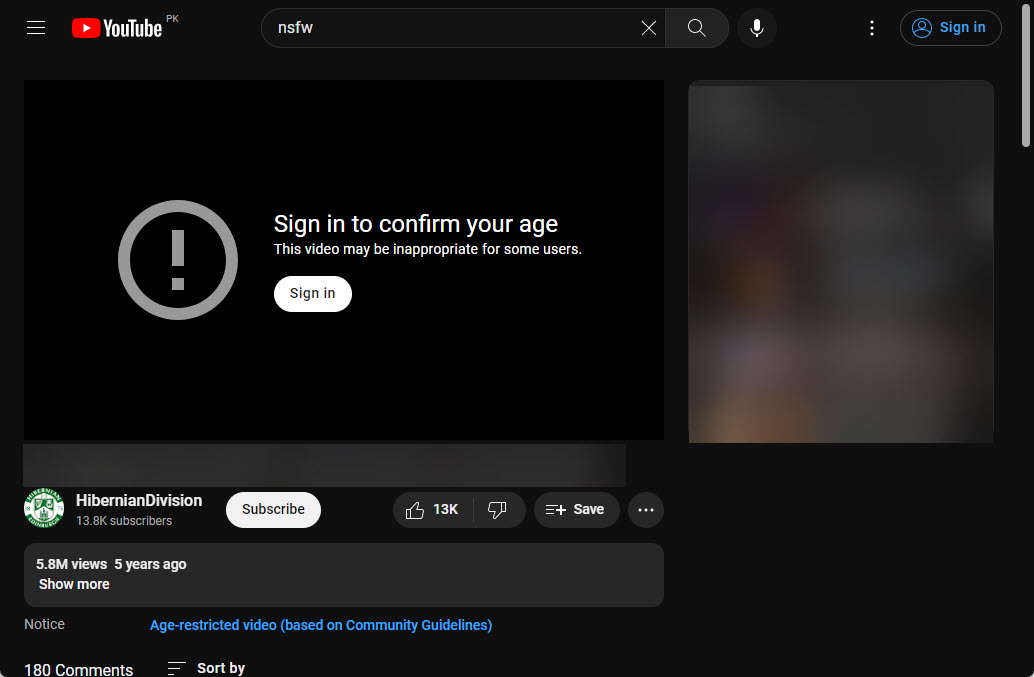
Restricted content සඳහා YouTube එකේ age prompt එක.
Troubleshooting
Problem: Restricted Mode එක locked/greyed out වෙලා.
Solution: Network administrator කෙනෙක්, school එකක්, හෝ parental control එකක් මේක enforce කරන්න පුළුවන් — administrator ව contact කරන්න.
Problem: ඒක ආයෙත් තනියම enable වෙනවා.
Solution: මේක per browser/device එකට set වෙනවා; cookies clear කරන්න හෝ enforce කරන network policy එකක් හෝ supervised account එකක් තියෙනවද බලන්න.
Problem: Age-restricted video එක play වෙන්නේ නැහැ.
Solution: Of-age account එකකින් sign in වෙලා ඔබේ Google account එකේ වයස verify කරන්න.
Problem: Filter එක වැඩියෙන් strict/loose.
Solution: Restricted Mode එක automated signals පාවිච්චි කරනවා; device එකේ audience එකට ගැලපෙන්න ඒක toggle කරන්න.
Conclusion
Restricted Mode කියන්නේ ඔබට YouTube account menu එකෙන් toggle කරන්න පුළුවන් simple, per-device content filter එකක්. Age restrictions වෙනම දෙයක් වන අතර ඒවා YouTube විසින් enforce කරනවා — එවැනි videos බලන්න හරි ක්රමය තමයි age requirement එක සම්පූර්ණ කරන account එකකින් sign in වීම.
About TechHub
මේ guide එක TechHub Knowledge Base එකේ කොටසක්. තව step-by-step IT guides සහ support වලට techhub.com.lk එකට යන්න.