













Overview
PuTTY එකේ "Network Error: Connection Timed Out" එකෙන් අදහස් වෙන්නේ ඒකට SSH server එකට reach කරන්න බැරි වුණා කියලා. හේතුව බොහෝවිට වැරදි address/port එකක්, SSH service එක running නැති එක, හෝ firewall එකක් connection එක block කරන එක. මේ guide එකෙන් fixes හරහා යනවා.
SSH server එකට reach කරන්න බැරි වුණාම PuTTY timeout වෙනවා.
Key Takeaways
- Host address එකයි port එකයි confirm කරන්න (default SSH 22).
- Target එකේ SSH server/service එක running කියලා බලන්න.
- Firewall එකක් හෝ antivirus එකක් connection එක block නොකරන බව බලන්න.
- ping එකෙන් සහ port check එකකින් reachability test කරන්න.
ඇයි මේක වෙන්නේ
- PuTTY එකේ වැරදි IP/hostname එකක් හෝ port එකක්.
- Server එකේ SSH (sshd) service එක running නෑ.
- Firewall එකක් (කොයි පැත්තක හෝ) හෝ network එක port 22 block කරනවා.
- Host එක offline, නැත්නම් ඔබේ network එකෙන් unreachable.
Fix 1 — Address එකයි Port එකයි Confirm කරන්න
1. PuTTY එකේ (Session settings) hostname/IP එකයි port එකයි double-check කරන්න.
2. Port එක server එකේ SSH port එකට (default 22) match වෙනවා කියලා බලන්න.
3. Reachability test කරන්න: host එක ping කරලා, port එක check කරන්න (බ. PowerShell එකේ Test-NetConnection host -Port 22).
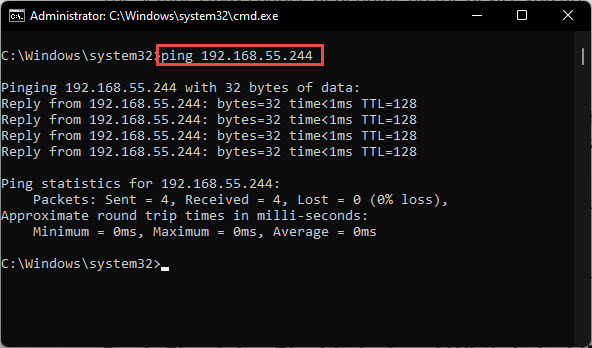
SSH server එක reachable ද confirm කරන්න ping කරන්න.
Fix 2 — Server එකේ SSH Service එක Check කරන්න
1. Linux server එකක: sshd running කියලා බලන්න (sudo systemctl status ssh / sshd).
2. Windows (OpenSSH Server) එකක: sshd service එක Running කියලා confirm කරන්න.
3. Stopped නම් service එක start කරන්න.
Fix 3 — Firewalls සහ Antivirus Check කරන්න
1. Server එකේ, inbound TCP port 22 firewall එකෙන් allow කරන්න.
2. ඔබේ PC එකේ, test කරන්න third-party antivirus/firewall තාවකාලිකව disable කරලා, ඊට පස්සේ PuTTY/SSH වලට rule එකක් add කරන්න.
3. Port එක block කරන්න පුළුවන් network firewall හෝ router එකක් බලන්න.
Troubleshooting
Problem: Ping වැඩ කරනවා ඒත් PuTTY තවම timeout වෙනවා.
Solution: Host එක reachable ඒත් SSH port එක block වෙලා හෝ service එක down — port 22 open කරලා sshd start කරන්න.
Problem: Ping ත් fail වෙනවා.
Solution: Host එක unreachable. IP/hostname එක, device එක on කියලා, ඔබ හරි network/VPN එකේ කියලා බලන්න.
Problem: Locally වැඩ කරනවා ඒත් remotely නෑ.
Solution: Router එකේ port forwarding/NAT ඕන වෙන්න පුළුවන්, public IP/port එක open සහ correct වෙන්න ඕන.
Problem: Connection refused vs timed out.
Solution: "Refused" කියන්නේ port එක closed ඒත් reachable (service down); "timed out" කියන්නේ firewall/network එකක් packets drop කරනවා.
Conclusion
PuTTY timeout එකක් කියන්නේ connectivity problem එකක්: address එකයි port එකයි verify කරලා, SSH service එක running කියලා confirm කරලා, port 22 firewall එක open කරන්න. Connection එක fail වෙන්නේ කොහෙද pinpoint කරන්න ping සහ port test පාවිච්චි කරන්න.
About TechHub
මේ guide එක TechHub Knowledge Base එකේ කොටසක්. තව step-by-step IT guides සහ support වලට techhub.com.lk එකට යන්න.





