Overview
Windows Media Center was Microsoft’s all-in-one hub for playing videos, music, photos, live TV and DVDs. Although Microsoft retired it after Windows 8.1, the application can still be installed on Windows 10 and Windows 11 using a community-maintained package built from the original Microsoft files. This guide explains how to add Media Center safely and what to do if it does not start.
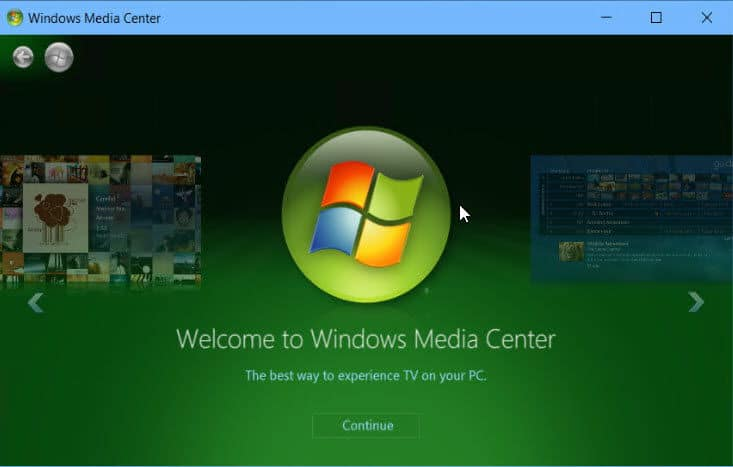
The classic Windows Media Center interface running on a modern Windows PC.
Key Takeaways
- Windows Media Center is not included in Windows 10 or 11 by default.
- A community package repackages Microsoft’s original Media Center binaries so they run on current builds.
- Installation requires an elevated Command Prompt and a system restart.
- Media Center is unsupported by Microsoft, so treat it as a legacy convenience rather than a maintained app.
- Consider modern alternatives such as the Media Player app, VLC or Kodi for active development and codec support.
Before You Begin
Media Center relies on legacy components. Create a system restore point first so you can roll back if anything behaves unexpectedly, and make sure your Windows installation is fully updated.
<w:bottom w:val="single" w:color="FBE4E4" w:sz="2" w:space="4"/><w:left w:val="single" w:color="C0392B" w:sz="24" w:space="8"/><w:right w:val="single" w:color="FBE4E4" w:sz="2" w:space="4"/></w:pBdr><w:shd w:fill="FBE4E4" w:color="auto" w:val="clear"/><w:spacing w:before="80" w:after="160"/><w:ind w:left="120" w:right="120"/></w:pPr><w:r><w:rPr><w:b/><w:bCs/><w:color w:val="C0392B"/><w:sz w:val="21"/><w:szCs w:val="21"/><w:rFonts w:ascii="Calibri" w:cs="Calibri" w:eastAsia="Calibri" w:hAnsi="Calibri"/></w:rPr><w:t xml:space="preserve">Warning: Only download the Media Center package from a reputable, well-known source and scan it with your antivirus before running it. Because the installer runs with administrator rights, an untrusted copy could compromise your system.
Install Windows Media Center
1. Download the Windows Media Center package from a trusted community source and extract the ZIP archive to a folder.
2. Open the extracted folder and locate the installer script (commonly named "_TestRights.cmd" and "Installer.cmd").
3. Right-click "_TestRights.cmd" and choose "Run as administrator" to confirm the files have the correct permissions.
4. Right-click "Installer.cmd" and select "Run as administrator".
5. In the console window, press the number key that corresponds to "Install Windows Media Center".
6. Wait for the script to register the components, then restart your computer when prompted.

Running the Media Center installer from an elevated console.
<w:bottom w:val="single" w:color="E2F0E1" w:sz="2" w:space="4"/><w:left w:val="single" w:color="2E7D32" w:sz="24" w:space="8"/><w:right w:val="single" w:color="E2F0E1" w:sz="2" w:space="4"/></w:pBdr><w:shd w:fill="E2F0E1" w:color="auto" w:val="clear"/><w:spacing w:before="80" w:after="160"/><w:ind w:left="120" w:right="120"/></w:pPr><w:r><w:rPr><w:b/><w:bCs/><w:color w:val="2E7D32"/><w:sz w:val="21"/><w:szCs w:val="21"/><w:rFonts w:ascii="Calibri" w:cs="Calibri" w:eastAsia="Calibri" w:hAnsi="Calibri"/></w:rPr><w:t xml:space="preserve">Tip: After installation, search the Start menu for "Windows Media Center" to launch it. Pin it to the taskbar for quick access.
Modern Alternatives
If you mainly need media playback rather than the exact Media Center look, several actively supported options exist. The built-in Media Player app in Windows 11 handles music and video. VLC plays almost any format without extra codecs. Kodi offers a full ten-foot "living room" interface similar to Media Center, including library management and add-ons.
Troubleshooting
Problem: Windows Media Center does not appear after installation.
Solution: Restart the computer to finish component registration. If it is still missing, re-run "Installer.cmd" as administrator and confirm no antivirus blocked the files.
Problem: The installer closes immediately without completing.
Solution: Run "_TestRights.cmd" as administrator first. If it reports a permissions error, unblock the ZIP (Properties > Unblock) before extracting and try again.
Problem: Media Center opens but crashes when playing DVDs or TV.
Solution: Install a compatible MPEG-2 decoder or use a modern player like VLC. Some DVD and TV tuner features depend on drivers that are no longer maintained.
Problem: A Windows feature update removes Media Center.
Solution: Major Windows updates can strip legacy components. Simply re-run the installer package after the update completes to restore Media Center.
Conclusion
Windows Media Center can be revived on Windows 10 and 11 with a trusted community package and an elevated installer. Because it is unsupported, keep a restore point handy and consider modern players like the Media Player app, VLC or Kodi for long-term reliability and codec support.
About TechHub
This guide is part of the TechHub Knowledge Base. For more step-by-step IT guides and support, visit techhub.com.lk.