Overview
Program එකක් install වෙන්නේ නෑ, නැත්නම් uninstall වෙන්න refuse කරනවා නම්, Microsoft's "Program Install and Uninstall" Troubleshooter එකෙන් underlying issue එක fix කරන්න පුළුවන් — බොහෝවිට operation එක block කරන corrupt registry key එකක්. මේ guide එකෙන් ඒක මොකද කරන්නේ සහ safely run කරන ආකාරය පැහැදිලි කරනවා.
Program Install and Uninstall Troubleshooter එක.
Key Takeaways
- Blocked installs සහ stuck uninstalls repair කරනවා.
- Updates වළක්වන corrupt registry keys fix කරනවා.
- Microsoft's official site එකෙන් විතරයි download කරන්න.
- ඒක step by step guide කරලා fixes automatically apply කරනවා.
Troubleshooter එක මොකද කරන්නේ
- Programs install වෙන එක වළක්වන problems resolve කරනවා.
- Programs uninstall වෙන එක වළක්වන problems resolve කරනවා.
- 64-bit systems වල corrupted registry keys repair කරනවා.
- Partially removed software වලින් ඉතුරු වෙච්ච issues clear කරනවා.
Download කරලා Run කරන්න
Warning: Troubleshooter එක download කරන්නේ Microsoft's official support site (support.microsoft.com) එකෙන් විතරයි. Third-party "fixer" downloads avoid කරන්න.
1. Microsoft's official support page එකට ගිහින් "Program Install and Uninstall Troubleshooter" (MicrosoftProgram_Install_and_Uninstall.meta.diagcab) download කරන්න.
2. Download කරපු .diagcab file එක run කරලා Next click කරන්න.
3. ඔබට problem තියෙන්නේ Installing ද Uninstalling ද තෝරන්න.
4. List එකෙන් affected program එක select කරන්න.
5. Troubleshooter එකට fixes detect කරලා apply කරන්න දීලා, prompts follow කරන්න.
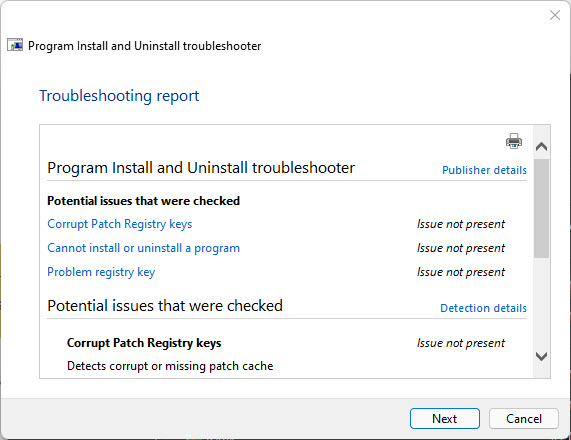
Detailed troubleshooting information එක review කරන්න.
Troubleshooting
Problem: Program එක list එකේ නෑ.
Solution: "Not Listed" තෝරලා program එකේ product code එකට හෝ installer එකට browse කරන්න; සමහර apps වෙනස් විදිහට register වෙනවා.
Problem: Troubleshooter කියනවා fix කළා කියලා ඒත් issue එක තියෙනවා.
Solution: PC එක restart කරලා install/uninstall එක ආපහු try කරන්න; reboot එකෙන් registry repairs finalize කරනවා.
Problem: .diagcab එක open වෙන්නේ නෑ.
Solution: Right-click කරලා Run as administrator; Troubleshooting/Diagnostics service එක enabled කියලා බලන්න.
Problem: Uninstall තවම fail වෙනවා.
Solution: මුලින් app එකේම repair option එක පාවිච්චි කරන්න, නැත්නම් troubleshooter එක registry entry එක clear කළාට පස්සේ leftover files manually remove කරන්න.
Conclusion
Program Install and Uninstall Troubleshooter එක install හෝ remove වෙන්නේ නැති stubborn software වලට quick, official fix එකක්. Microsoft එකෙන් download කරලා, problem app එකට point කරලා, operation එක block කරන registry entries repair කරන්න දෙන්න.
About TechHub
මේ guide එක TechHub Knowledge Base එකේ කොටසක්. තව step-by-step IT guides සහ support වලට techhub.com.lk එකට යන්න.