Overview
AcroTray (AcroTray.exe) කියන්නේ Adobe Acrobat එක්ක install වෙන background helper එකක් — PDF conversion tasks වලට උදව් වෙනවා. ඒක legitimate ඒත් නිතරම running තියාගන්න essential නෑ. මේ guide එකෙන් ඒක මොකක්ද සහ disable කරන safe ක්රම කිහිපයක් පැහැදිලි කරනවා.
AcroTray කියන්නේ මොකක්ද, ඒක disable කරන්නේ කොහොමද.
Key Takeaways
- AcroTray කියන්නේ PDF conversion වලට Adobe Acrobat helper එකක්.
- ඒක background එකේ සහ startup එකේ run වෙනවා.
- Task Manager, Services, හෝ Registry එකෙන් stop කරන්න පුළුවන්.
- Disable කරන එකෙන් core Acrobat functionality break වෙන්නේ නෑ.
AcroTray කියන්නේ මොකක්ද
AcroTray එකෙන් Adobe Acrobat එකේ "print to PDF" සහ conversions වගේ features support කරනවා. Genuine file එක තියෙන්නේ Adobe's install folder එකේ (බ. C:\Program Files (x86)\Adobe\Acrobat\...). වෙන තැන්වල copies suspicious වෙන්න පුළුවන්.
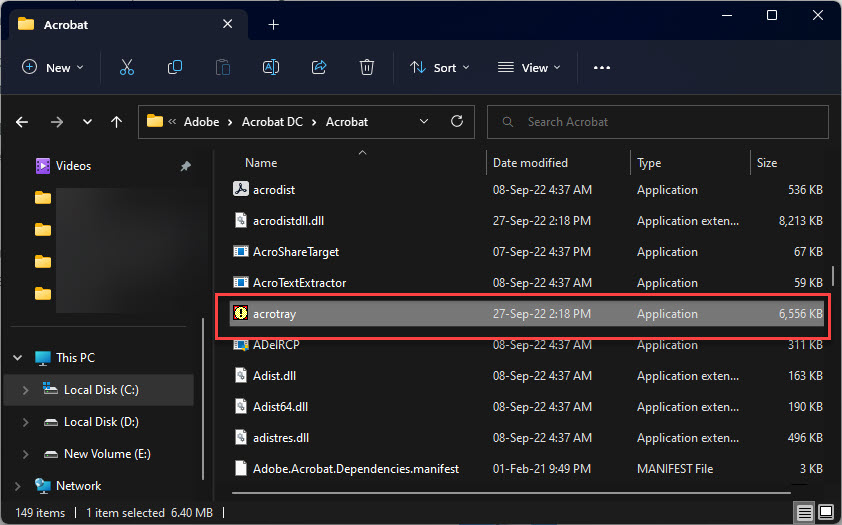
AcroTray.exe එකේ install location එක.
Method 1: Task Manager (Startup)
1. Task Manager (Ctrl + Shift + Esc) open කරන්න.
2. Startup apps tab එකට යන්න.
3. AcroTray select කරලා Disable click කරන්න.
4. ඒක තවදුරටත් boot එකේදී launch වෙන්නේ නෑ.
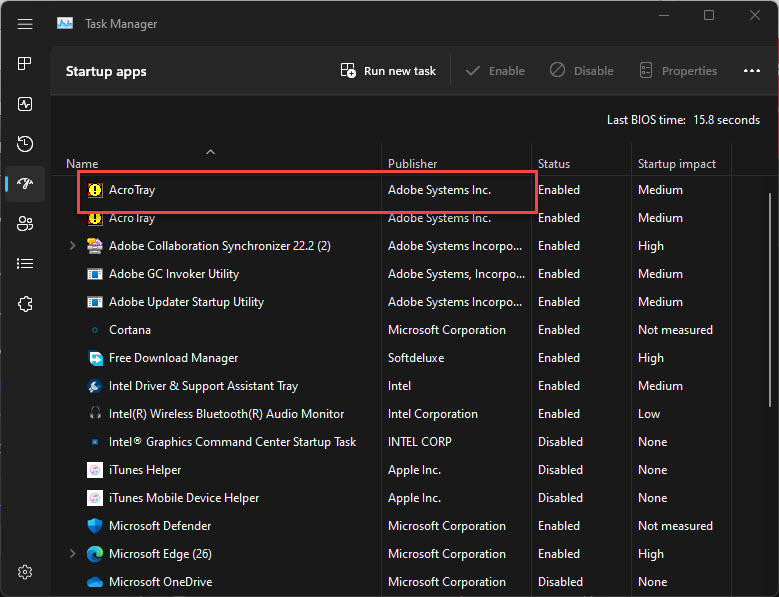
Startup apps වල AcroTray listed.
Method 2: Process එක End කරන්න
1. Task Manager > Processes එකේ, AcroTray හොයන්න.
2. Right-click කරලා End task තෝරලා current session එකට ඒක stop කරන්න.
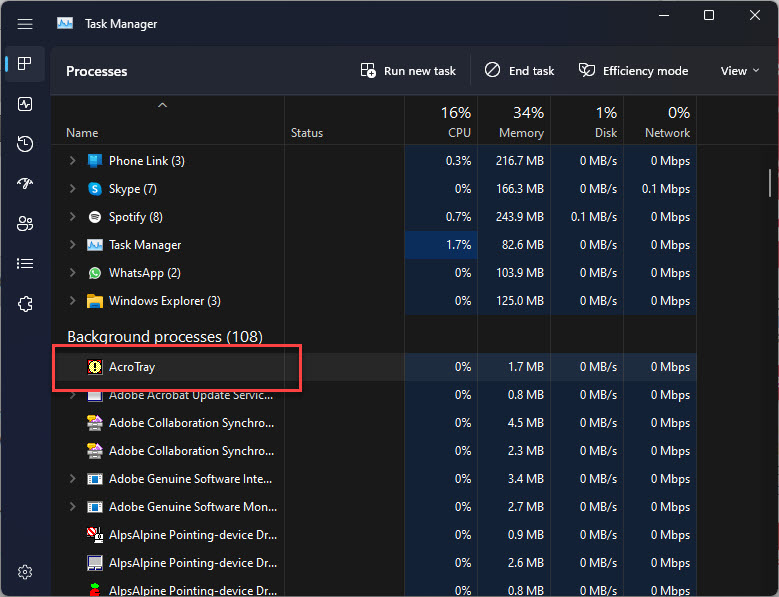
AcroTray background එකේ running.
Method 3: Services
1. services.msc open කරන්න.
2. Related Adobe Acrobat services හොයන්න.
3. Automatic ඕන නැත්නම් අදාළ service එකේ Startup type එක Manual කරන්න.
Method 4: Registry (Advanced)
Warning: Registry එක වැරදියට edit කරන එකෙන් problems ඇති වෙන්න පුළුවන්. මුලින් Registry එක backup කරන්න.
1. regedit open කරන්න.
2. HKEY_LOCAL_MACHINE\SOFTWARE\Microsoft\Windows\CurrentVersion\Run (සහ HKCU equivalent එක) වලට යන්න.
3. Startup එකේදී load වෙන එක නවත්තන්න AcroTray entry එක delete කරන්න.
Troubleshooting
Problem: Adobe update එකකට පස්සේ AcroTray ආපහු එනවා.
Solution: Updates startup entry එක ආපහු add කරන්න පුළුවන් — Task Manager > Startup එකේ ආපහු disable කරන්න.
Problem: PDF "print to" features වැඩ නවතිනවා.
Solution: AcroTray ආපහු enable කරන්න; ඒක සමහර Acrobat conversion features වලට උදව් වෙනවා.
Problem: AcroTray.exe Adobe folder එකෙන් පිට.
Solution: ඒක suspicious — Windows Security එකෙන් scan කරන්න, malware සමහරවිට නම mimic කරනවා.
Problem: Startup එකෙන් disable කරන්න බෑ.
Solution: ඒකට හැම startup entry එකක්ම හොයලා remove කරන්න Microsoft's Autoruns tool එක පාවිච්චි කරන්න.
Conclusion
AcroTray කියන්නේ harmless Adobe Acrobat helper එකක්, ඒත් ඒක හැමවෙලේම running තියෙන්න ඕන නෑ. සරලම fix එකට Task Manager's Startup tab එකෙන් disable කරලා — imposter එකක් rule out කරන්න file එක Adobe's folder එකේ තියෙනවා කියලා verify කරන්න.
About TechHub
මේ guide එක TechHub Knowledge Base එකේ කොටසක්. තව step-by-step IT guides සහ support වලට techhub.com.lk එකට යන්න.