Overview
Control Panel applets කියන්නේ Control Panel එක ඇතුළේ තියෙන individual tools (Programs, Network, හෝ Sound වගේ). ගොඩක් ඒවා නමින්ම direct launch කරන්න පුළුවන් .cpl files වලින් backed — menus හරහා click කරනවට වඩා වේගවත්. මේ guide එකෙන් CPL files පැහැදිලි කරලා වැඩිපුරම useful commands list කරනවා.
Control Panel applets ඒවායේ .cpl command එකෙන් direct open කරන්න පුළුවන්.
Key Takeaways
- .cpl file එකක් කියන්නේ නමින් run කරන්න පුළුවන් Control Panel applet එකක්.
- එකක් open කරන්න ඒකේ command එක Run box (Windows + R), Command Prompt, හෝ PowerShell එකේ type කරන්න.
- Common examples: appwiz.cpl (Programs), ncpa.cpl (Network), sysdm.cpl (System).
- ගොඩක් .cpl files තියෙන්නේ C:\Windows\System32 එකේ.
CPL File එකක් Open කරන්නේ කොහොමද
1. Run open කරන්න Windows key + R press කරන්න.
2. Applet command එක, බ. ncpa.cpl, type කරලා Enter කරන්න.
3. එම command එක Command Prompt හෝ PowerShell එකේත් run කරන්න පුළුවන්.
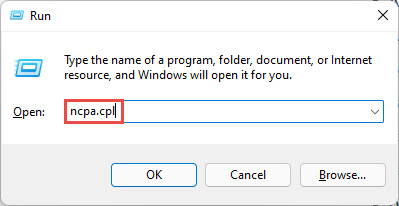
Run box එකෙන් CPL applet එකක් direct open කරන්න.
වැඩිපුරම Useful Control Panel Commands
- appwiz.cpl — Programs and Features (apps uninstall කරන්න).
- ncpa.cpl — Network Connections (adapters).
- sysdm.cpl — System Properties (hardware, advanced, remote).
- desk.cpl — Display settings.
- timedate.cpl — Date and Time.
- mmsys.cpl — Sound (playback/recording devices).
- powercfg.cpl — Power Options.
- inetcpl.cpl — Internet Properties.
- main.cpl — Mouse settings.
- firewall.cpl — Windows Defender Firewall.
- intl.cpl — Region and language.
- hdwwiz.cpl — Device Manager / Add Hardware.
- wscui.cpl — Security and Maintenance.
- joy.cpl — Game Controllers.
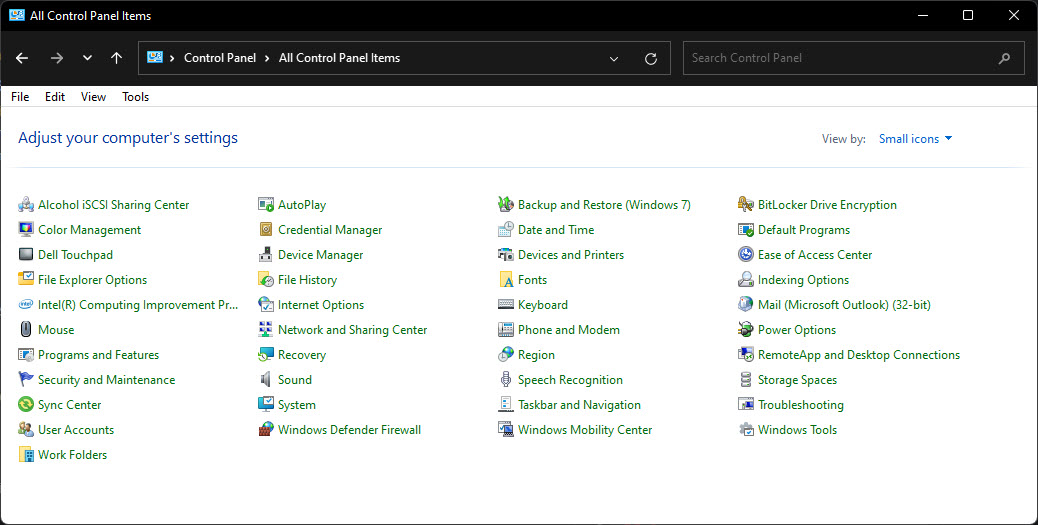
Control Panel එකේ තියෙන applets.
ඔබේ PC එකේ CPL Files ඔක්කොම List කරන්න
1. Command Prompt open කරන්න.
2. Run: dir C:\Windows\System32\*.cpl
3. මේකෙන් ඔබේ system එකේ තියෙන හැම Control Panel applet file එකක්ම list වෙනවා.
CPL vs MSC Files
- .cpl — Control Panel applets (බ. appwiz.cpl).
- .msc — Microsoft Management Console snap-ins (බ. services.msc, devmgmt.msc).
- දෙකම එකම විදිහට launch කරනවා (Run box හෝ command line) ඒත් වෙනස් tool types open කරනවා.
Troubleshooting
Problem: .cpl command එකෙන් මුකුත් වෙන්නේ නෑ.
Solution: Spelling එකයි, applet එක ඔබේ edition/version එකේ තියෙනවද කියලා බලන්න. සමහර applets Settings app එකට move කරලා.
Problem: Applet එක Control Panel වෙනුවට Settings open කරනවා.
Solution: Windows 11 සමහර legacy applets Settings වලට redirect කරනවා. Modern Settings page එක, නැත්නම් තවම classic window එක open කරන specific control commands පාවිච්චි කරන්න.
Problem: "Windows cannot find" the file.
Solution: ඒක System32 එකෙන් හෝ full path C:\Windows\System32\name.cpl එකෙන් run කරන්න.
Problem: Command එකක් අමතක වුණා.
Solution: dir C:\Windows\System32\*.cpl එකෙන් list කරන්න, නැත්නම් Control Panel open කරලා normal විදිහට navigate කරන්න.
Conclusion
Control Panel .cpl commands කියන්නේ specific tool එකකට කෙළින්ම යන්න වේගවත් ක්රමයක්. appwiz.cpl, ncpa.cpl, සහ sysdm.cpl වගේ favorites කිහිපයක් මතක තියාගෙන, ඕන වෙලාවක Run box එකෙන් run කරන්න.
About TechHub
මේ guide එක TechHub Knowledge Base එකේ කොටසක්. තව step-by-step IT guides සහ support වලට techhub.com.lk එකට යන්න.