Overview
Switch User option එකෙන් current user ගේ apps close නොකර accounts change කරන්න පුළුවන්. ඒක නෑ නම්, Fast User Switching policy එකකින් හෝ registry setting එකකින් disable කරලා ඇති, නැත්නම් account එකක් විතරයි තියෙන්නේ. මේ guide එකෙන් ඒක restore කරනවා.
Windows එකේ missing Switch User option එක restore කරන්න.
Key Takeaways
- Switch User rely කරන්නේ Fast User Switching enabled වීම මත.
- ඒක පෙන්නන්නේ user account එකකට වඩා තියෙනකොට විතරයි.
- Group Policy හෝ Registry එකෙන් re-enable කරන්න.
- Switch කරන එකෙන් අනිත් user ගේ apps background එකේ running තියාගන්නවා.
ඇයි නැත්තේ?
- Fast User Switching Group Policy හෝ registry එකෙන් disable කරලා.
- PC එකේ එක user account එකක් විතරයි.
- "Hide entry points for Fast User Switching" policy එකක් enabled.
Fix 1 — වෙන Account එකක් තියෙනවා කියලා බලන්න
1. Settings > Accounts > Other users open කරන්න.
2. එකක් විතරයි නම් දෙවෙනි account එකක් add කරන්න (Switch User වලට අඩුම දෙකක් ඕන).
3. Sign out කරලා Start menu/lock screen එකේ Switch user option එක බලන්න.
Fix 2 — Group Policy එකෙන් Fast User Switching Enable කරන්න
1. Windows key + R press කරලා gpedit.msc type කරලා Enter කරන්න (Pro/Enterprise).
2. Computer Configuration > Administrative Templates > System > Logon වලට යන්න.
3. "Hide entry points for Fast User Switching" එක Disabled හෝ Not Configured කරන්න.
4. OK click කරලා gpupdate /force run කරන්න.
Fix 3 — Registry එකෙන් Enable කරන්න
Warning: මුලින් registry එක backup කරන්න.
1. regedit open කරලා HKEY_LOCAL_MACHINE\SOFTWARE\Microsoft\Windows\CurrentVersion\Policies\System වලට යන්න.
2. HideFastUserSwitching කියන DWORD එක හොයන්න හෝ හදන්න.
3. Switch User පෙන්නන්න 0 කරන්න (1 එකෙන් hide කරනවා).
4. PC එක restart කරන්න.
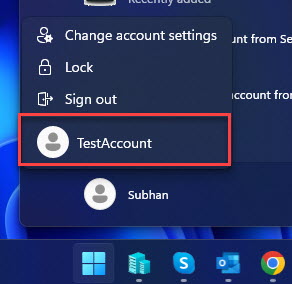
Start menu එකෙන් වෙන user account එකකට switch කරන්න.
Troubleshooting
Problem: Enable කළාට පස්සෙත් නෑ.
Solution: අඩුම accounts දෙකක් තියෙනවා, policy එක Disabled/Not Configured, HideFastUserSwitching 0 කියලා confirm කරලා, restart කරන්න.
Problem: gpedit.msc available නෑ.
Solution: Home editions වල registry method එක (HideFastUserSwitching = 0) පාවිච්චි කරන්න.
Problem: Work PC එකක hidden.
Solution: ඔබේ organisation එක policy එකෙන් Fast User Switching disable කරන්න පුළුවන්; IT එක්ක කතා කරන්න.
Problem: Switching slow.
Solution: Fast User Switching අනිත් sessions memory එකේ තියාගන්නවා; users කිහිපයක් signed in ඉන්නවා නම් ප්රමාණවත් RAM තියෙනවා කියලා බලන්න.
Conclusion
Fast User Switching enable වෙලා දෙවෙනි account එකක් තියෙනකොට Switch User option එක ආපහු එනවා. Group Policy එක හෝ HideFastUserSwitching registry value එක adjust කරලා, restart කරලා, sign out නොකර accounts switch කරන්න පුළුවන්.
About TechHub
මේ guide එක TechHub Knowledge Base එකේ කොටසක්. තව step-by-step IT guides සහ support වලට techhub.com.lk එකට යන්න.